What Hardware is Included in a POS System?
May 04, 2026
A modern point-of-sale solution is no longer just a cash register. Today, businesses rely on a complete ecosystem of POS hardware to manage transactions, inventory, customer data, and payment security. Whether you run a restaurant, retail store, supermarket, or hospitality business, understanding the right POS terminal components is essential before investing in a new system.
This guide explains the core POS devices included in a POS system, how each component works, and how businesses can choose the right hardware setup for long-term operational efficiency.
Why POS Hardware Matters
Software often gets most of the attention in POS discussions, but the physical hardware directly impacts speed, durability, and customer experience.
High-quality POS hardware helps businesses:
Reduce checkout time
Improve order accuracy
Support multiple payment methods
Simplify staff training
Lower maintenance costs
Improve counter organization
For industries with high transaction volume, reliable POS devices can directly affect revenue and customer satisfaction.
1. POS Terminal: The Core of Every POS System
The POS terminal is the primary device used to run sales operations. It functions as the central control unit where staff process orders, manage products, check inventory, and complete transactions.
Common POS terminal formats include:
All-in-One POS Terminal
An all-in-one unit integrates display, processor, and operating system into one compact device.
Benefits:
Space saving
Cleaner counter layout
Easier installation
Lower cable complexity
Many modern businesses prefer all-in-one systems because they combine multiple POS terminal components into one streamlined solution.
Modular POS System
A modular setup separates monitor, computer, and peripherals.
Benefits:
Flexible upgrades
Custom hardware selection
Easier replacement of individual parts
Businesses with unique workflows often choose modular POS hardware for scalability.
2. Touchscreen Display
A touchscreen is one of the most important POS devices in modern retail and restaurant environments.
Benefits include:
Faster order entry
Shorter employee onboarding
Fewer manual input errors
More intuitive navigation
Many businesses now use capacitive touchscreens for better durability and smoother user interaction.
Dual-Screen POS Displays
A dual-screen configuration includes:
Operator display
Customer-facing display
Customer displays improve transparency by showing:
Order details
Payment totals
Promotions
Loyalty programs
Brands like Aonpos offer dual-screen and all-in-one POS solutions designed for retail and restaurant operations, where customer interaction is part of the buying experience.
3. Receipt Printer
Receipt printers remain standard POS terminal components for both restaurants and retail stores.
Main printer types:
Thermal Receipt Printer
Most common option.
Advantages:
Fast printing
Quiet operation
Lower maintenance
No ink required
Impact Printer
Still used in some kitchen environments.
Advantages:
Multi-copy printing
Durable in heat-heavy conditions
Receipt printers are essential POS hardware for:
Transaction confirmation
Returns and exchanges
Kitchen ticket printing
Audit trails
4. Cash Drawer
Although digital payments continue to grow, many businesses still accept cash.
A cash drawer is a secure storage unit connected to the POS system.
Functions:
Organizes bills and coins
Opens automatically after cash transactions
Supports shift balancing and reconciliation
For hybrid payment businesses, cash drawers remain a necessary part of POS devices.
5. Barcode Scanner
A barcode scanner is critical for businesses managing large inventories.
Use cases:
Product lookup
Inventory management
Checkout acceleration
Pricing accuracy
Scanner types:
Handheld Scanner
Best for:
Retail stores
Warehouses
Inventory audits
Fixed Scanner
Best for:
Grocery stores
High-volume checkout lanes
Barcode scanners are among the highest ROI POS hardware investments because they significantly reduce manual errors.
6. Card Reader and Payment Terminal
A payment terminal allows businesses to accept:
EMV chip cards
Magnetic stripe cards
NFC/contactless payments
Mobile wallets
Modern payment readers are essential POS terminal components for payment flexibility and security compliance.
Important features:
PCI compliance
Encryption
Contactless support
Fast transaction approval
Restaurants and retail businesses should prioritize payment hardware that supports future payment trends.
7. Customer Display
Customer-facing displays are increasingly common POS devices.
Benefits:
Order verification
Reduced disputes
Upsell promotions
Branding opportunities
This hardware is especially valuable in restaurants and quick-service environments.
8. Additional POS Devices
Depending on industry needs, businesses may also require extra POS hardware:
Kitchen Display System (KDS)
Used in restaurants to replace paper tickets.
Label Printer
Used for:
Pricing labels
Shipping labels
Shelf tags
Cash Counting Machine
Useful for high-cash environments.
Weighing Scale
Common in grocery and food retail.
Handheld POS Device
Mobile checkout for:
Table service
Pop-up stores
Inventory scanning
These specialized POS devices help businesses customize workflows.
How to Choose the Right POS Hardware
When selecting POS hardware, businesses should evaluate:
Business Type
A restaurant needs different POS terminal components than a retail store.
Counter Space
Compact counters benefit from all-in-one terminals.
Transaction Volume
High-volume businesses need durable hardware.
Expansion Plans
Scalable systems reduce future replacement costs.
Integration Compatibility
Hardware should work seamlessly with POS software and payment providers.
For businesses comparing solutions, reviewing a complete buyer guide can help narrow down the best hardware-software combination.
Recommended Reading:Learn how to choose the best POS system for your business in this complete B2B guide:https://www.aonpostech.com/best-pos-system-for-restaurants-retail-in-2026-complete-b2b-buyer-guide
Conclusion
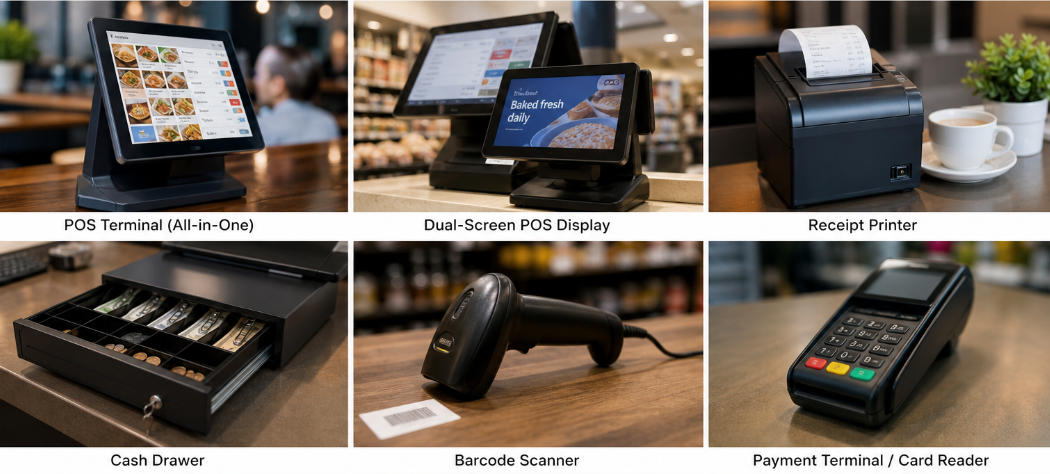
A complete POS system typically includes several essential POS hardware components:
POS terminal
Touchscreen display
Receipt printer
Cash drawer
Barcode scanner
Payment terminal
Customer display
Additional POS devices may include kitchen displays, label printers, handheld terminals, and scales depending on industry requirements.
Understanding these POS terminal components helps businesses invest in systems that improve efficiency, enhance customer experience, and support long-term growth.
As businesses increasingly move toward integrated solutions, manufacturers such as Aonpos continue developing all-in-one and dual-screen POS hardware designed for restaurants, retail stores, and supermarkets.