POS Solutions for Convenience Stores: How to Build a Faster and More Reliable Checkout
Jul 10, 2026
Convenience stores are built around speed. Customers expect to enter, find what they need, pay quickly, and continue with their day. Even a short delay at the checkout counter can create a visible queue, especially during morning rush hours, lunch breaks, late-night traffic, or promotional periods.
For store operators, however, speed is only one part of the challenge. A convenience store may process hundreds of small transactions each day while managing a wide range of products, barcode formats, payment methods, employee shifts, and inventory changes.
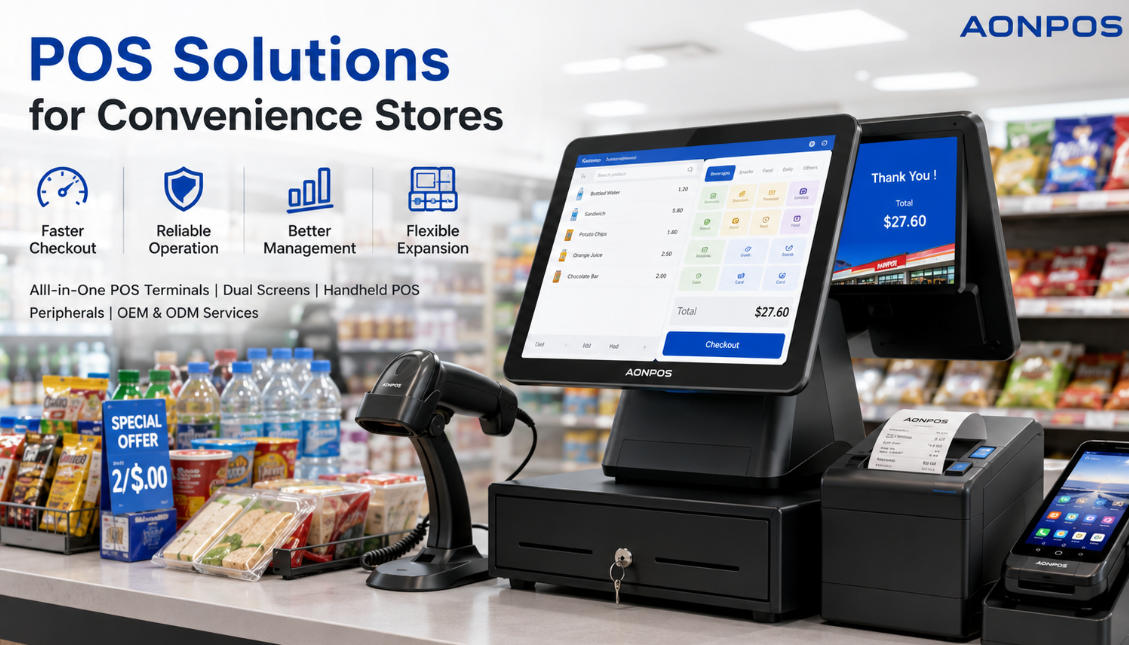
A well-designed convenience store POS solution brings these activities together at one reliable checkout point. With the right POS hardware, retailers can improve transaction efficiency, reduce cashier errors, make better use of limited counter space, and create a more consistent customer experience.
This guide explains what convenience stores should look for in a POS solution and how suitable hardware can support both independent retailers and multi-location chains.
What Is a Convenience Store POS Solution?
A convenience store POS solution is the combination of hardware, software, payment equipment, and peripherals used to complete transactions and support everyday retail operations.
A typical setup may include:
An all-in-one touchscreen POS terminal
POS or retail management software
A barcode scanner
A receipt printer
A cash drawer
A customer-facing display
A card or contactless payment terminal
Optional handheld POS devices
Unlike a traditional cash register that mainly records sales and stores cash, a modern POS environment can connect checkout activity with inventory records, product databases, employee permissions, promotions, and sales reporting.
The POS terminal acts as the main operating platform. Its processor, display, connectivity, ports, and physical construction can all affect how reliably the complete system performs.
Why Convenience Stores Have Specific POS Requirements
Convenience stores operate differently from many other retail businesses. They usually have smaller floor areas, longer opening hours, frequent low-value transactions, and a broad mix of fast-moving products.
These operating conditions create several important requirements.
Fast Transaction Processing
Customers often visit convenience stores because they want to make a quick purchase. Slow product searches, delayed barcode input, or unresponsive touchscreens can significantly affect the checkout experience.
A suitable convenience store POS terminal should provide responsive touch control and sufficient computing performance for the retailer’s selected POS software, product database, and connected peripherals.
Reliable Operation During Long Business Hours
Many convenience stores operate from early morning until late at night, while some remain open 24 hours a day. The checkout terminal may therefore be used continuously across multiple employee shifts.
Commercial POS hardware should be designed for frequent daily use. Stable internal components, appropriate heat management, durable enclosures, and reliable storage are especially important in long-hour retail environments.
Support for Large Product Databases
Although convenience stores are usually compact, they may stock thousands of SKUs, including packaged food, beverages, household products, personal-care items, and seasonal merchandise.
The selected terminal should be able to run the store’s inventory and checkout software smoothly as the product database grows.
Compatibility With Multiple Peripherals
A convenience store checkout station may need to connect with several devices at the same time. These can include a barcode scanner, receipt printer, cash drawer, weighing scale, payment terminal, customer display, or membership card reader.
Before purchasing hardware, buyers should check the number and type of available interfaces. USB, serial, LAN, audio, display, and cash-drawer connectivity may all be relevant, depending on the planned deployment.
Efficient Use of Counter Space
Counter space is valuable in a convenience store. The checkout area may also contain impulse-purchase products, payment equipment, shopping bags, promotional materials, and security devices.
An all-in-one POS system combines the touchscreen and computer components into one unit, helping reduce cable clutter and create a cleaner checkout area.
Essential Features of a Convenience Store POS System
The best configuration depends on the store’s software, transaction volume, and operating model. However, several features are particularly important for convenience retail.
1. Responsive Touchscreen Operation
Cashiers repeatedly select items, enter quantities, apply discounts, and choose payment methods. A responsive capacitive touchscreen can make these actions faster and more intuitive.
A flat touchscreen surface is also easier to clean than a traditional keyboard-based checkout setup, which can be useful in stores selling food and beverages.
Screen size should be selected according to counter space and software layout. A 15-inch display is a common option because it provides enough room for product buttons and transaction details without requiring an excessively large installation area.
For stores with particularly limited space, a smaller terminal such as a compact 12-inch POS may be more appropriate.
2. Barcode Scanner Integration
Barcode scanning is central to convenience store operations. It reduces manual product entry and helps cashiers process transactions more accurately.
The scanner should read the barcode types used across the store’s product range. Retailers may choose among handheld, presentation, or embedded scanners depending on checkout volume and counter layout.
A fixed presentation scanner can be useful at busy counters because the cashier can move products past the scanning window with both hands. A handheld scanner offers greater flexibility for large or awkwardly shaped products.
3. Receipt Printer Compatibility
Thermal receipt printers are commonly used in retail because they print quickly and do not require ink cartridges. For convenience stores with high daily transaction volumes, print speed, cutter durability, paper width, and ease of paper replacement should be considered.
The printer must also be compatible with the selected operating system and POS software.
4. Multiple Payment Options
Modern shoppers may expect to pay using cash, bank cards, mobile wallets, QR codes, or other local payment methods.
Payment processing is normally handled through compatible third-party payment terminals and software. Therefore, retailers should confirm that their selected POS environment can connect to the required payment equipment.
Handheld payment devices may also provide additional flexibility. A portable terminal can support queue reduction, curbside collection, mobile selling, or temporary checkout points during busy periods.
AONPOS offers a range of handheld POS terminals designed for mobile retail and payment-related applications. Available models include configurations with touchscreens, wireless connectivity, barcode scanning, or built-in thermal printing, depending on the device.
5. Customer-Facing Display
A second screen can show customers the scanned items, quantities, prices, discounts, and transaction total. This improves transparency and gives customers an opportunity to identify mistakes before payment is completed.
The display may also be used for promotional content, membership information, or digital advertising when supported by the retailer’s software.
Convenience stores comparing display configurations can review this guide to dual-screen vs. single-screen POS systems.
A single-screen terminal is often sufficient for a small independent store with limited counter space. A dual-screen system may be more valuable when customer engagement, order confirmation, or promotional content is a priority.
6. Stable Network Connectivity
A POS terminal may need network access for cloud-based management, payment communication, remote support, inventory synchronization, or multi-store reporting.
Depending on the installation, connectivity may include:
Ethernet
Wi-Fi
Bluetooth
Mobile network connectivity through a separate device
Wired Ethernet is generally preferred for a fixed checkout counter because it can provide a stable connection. Wi-Fi offers greater flexibility where running cables is difficult.
Retailers should also discuss offline operating requirements with their software provider. The ability to continue recording transactions during a temporary network interruption can be important for stores that cannot afford to stop serving customers.
7. Suitable Processor, Memory, and Storage
POS hardware does not need to be a high-end workstation, but its configuration should match the software workload.
A basic checkout application may run well on an entry-level commercial processor, while larger databases, multimedia content, multiple integrations, or background applications may require a more powerful CPU and additional memory.
Solid-state storage is generally preferred because it supports fast system startup and contains no moving mechanical parts.
AONPOS all-in-one terminal configurations are available with different processor, memory, and storage options, allowing system integrators and buyers to select specifications for their software environment. Specific options vary by product and project.
8. Easy Maintenance and Peripheral Replacement
Convenience stores cannot tolerate extended checkout downtime. A practical POS deployment should make routine maintenance straightforward.
Retailers should consider:
Easy access to cables and ports
Replaceable external peripherals
Clear installation documentation
Availability of spare units or replacement parts
Remote software support
Standardized hardware across store locations
For multi-store projects, using the same terminal and peripheral configuration across every branch can simplify employee training, technical support, and spare-parts management.
Recommended POS Hardware Configurations
There is no single configuration that fits every convenience store. The following deployment models provide a practical starting point.
Configuration A: Compact Independent Store
A small neighborhood store may only require:
One single-screen all-in-one POS terminal
One barcode scanner
One thermal receipt printer
One cash drawer
One external payment terminal
This setup is suitable for stores with one checkout counter and moderate transaction volume.
The compact design helps preserve counter space, while a single-screen terminal keeps hardware costs under control.
Configuration B: High-Traffic Convenience Store
A busy urban or transport-location store may benefit from:
A high-performance all-in-one POS terminal
A customer-facing second display
A presentation barcode scanner
A high-speed receipt printer
A cash drawer
A contactless payment terminal
A backup checkout terminal
A dual-screen setup can improve transaction transparency, while a faster scanner and printer help maintain throughput during peak periods.
The AONPOS dual-screen POS range includes commercial touchscreen terminals designed for retail checkout environments, with selectable hardware configurations and peripheral connectivity options.
Configuration C: Multi-Location Convenience Store Chain
A chain deployment may include:
Standardized POS terminals across all branches
Centralized POS and inventory software
Customer-facing displays
Integrated barcode scanners and receipt printers
Handheld devices for inventory or mobile checkout
Remote device management
Spare terminals for rapid replacement
Consistency is especially important for chains. Standard hardware reduces variation between locations and makes installation, software imaging, support, and employee training easier.
Configuration D: Convenience Store With Mobile Checkout
Some retailers may need mobile transaction capabilities for:
Queue busting
Outdoor promotions
Curbside pickup
Delivery payments
Inventory verification
Temporary checkout stations
In these situations, a fixed terminal can remain the main checkout station while a handheld POS device provides mobility elsewhere in the store.
Single-Screen or Dual-Screen POS?
Choosing between these formats depends on the checkout process and available space.
Advantages of a Single-Screen POS
A single-screen terminal offers:
A smaller footprint
Simpler installation
Lower initial hardware cost
Fewer cables and display components
A practical setup for low- to medium-volume stores
The AONPOS AP14, for example, is presented as a compact single-screen terminal suitable for retail environments where space and budget are important considerations.
Advantages of a Dual-Screen POS
A dual-screen terminal can provide:
Customer-visible transaction information
Improved price transparency
Advertising or promotional space
Loyalty-program messaging
A more interactive checkout experience
The second display is most valuable when the POS software can use it effectively. Buyers should confirm software support before ordering a specific customer-display configuration.
All-in-One POS vs. Traditional Cash Register
Traditional cash registers remain suitable for very basic transaction recording. However, they are usually less flexible when a retailer needs inventory control, detailed reporting, employee management, or integration with additional systems.
An all-in-one POS terminal provides a platform on which compatible retail software can manage a broader range of activities. Compared with a basic register, a modern POS setup can support inventory records, transaction reporting, employee permissions, and other operational tools when these features are included in the installed software.
Retailers evaluating both options can read All-in-One POS vs. Traditional Cash Register for a more detailed comparison.
How to Choose the Right Convenience Store POS
Before selecting a system, retailers, distributors, and solution integrators should define their project requirements clearly.
Evaluate the Checkout Workload
Consider:
Average daily transaction volume
Peak-hour transaction volume
Number of checkout counters
Typical basket size
Number of active SKUs
Required payment methods
Store opening hours
A store operating around the clock may place greater emphasis on reliability and spare-unit availability than a small shop with limited opening hours.
Confirm Software Compatibility
Hardware and software must be evaluated together.
Before placing an order, confirm:
Required operating system
Minimum processor and memory specifications
Touchscreen compatibility
Display resolution requirements
Printer and scanner drivers
Payment-terminal integration
Customer-display support
Required communication ports
Do not assume that every peripheral will work automatically with every POS application.
Review Physical Installation Conditions
Measure the checkout counter and identify the available power outlets, network connections, and cable routes.
Also consider:
Ambient temperature
Dust exposure
Risk of liquid spills
Screen viewing angle
Cashier ergonomics
Customer-display position
Ventilation around the terminal
A technically suitable terminal can still cause operational problems if it does not fit the physical checkout environment.
Consider Future Expansion
A growing retailer may later add more branches, checkout stations, customer displays, or mobile devices.
Choosing scalable hardware configurations from the beginning can help reduce the cost of future expansion. For chain projects, it is also useful to ask how long the selected model or platform is expected to remain available.
Compare Total Cost of Ownership
The lowest purchase price does not always produce the lowest long-term cost.
Total cost of ownership may include:
Hardware purchase price
Shipping and import costs
Software licensing
Payment integration
Installation
Employee training
Maintenance
Replacement parts
Downtime
Future expansion
Commercial-grade hardware may provide better long-term value when it reduces failures and supports easier servicing.
Why Choose AONPOS for Convenience Store POS Hardware?
AONPOS is a POS hardware manufacturer offering all-in-one touch POS terminals, touch monitors, kiosk products, printers, barcode scanners, stands, and other checkout peripherals. The company states that it has focused on ODM/OEM manufacturing since 2012.
For convenience store projects, AONPOS can support buyers requiring:
Multiple Terminal Formats
The AONPOS product range includes single-screen, dual-screen, Windows-based, Android-based, desktop, and handheld POS hardware.
This allows buyers to create different configurations for compact counters, high-volume checkout stations, customer-facing displays, or mobile retail applications.
Configurable Hardware Specifications
Selected models are offered with optional processor, memory, storage, display, and peripheral configurations. This gives distributors and system integrators greater flexibility when matching the hardware to their software platform and target market.
OEM and ODM Services
AONPOS supports OEM/ODM projects for customers that need customized branding or hardware configurations.
Depending on order requirements and technical feasibility, customization may include:
Brand logos
Housing colors
Processor and memory options
Storage capacity
Customer-facing displays
Touchscreen sizes
Interfaces and built-in modules
Product packaging
Final specifications should be confirmed directly with the AONPOS team before production.
POS Peripherals From One Supplier
In addition to terminals, AONPOS manufactures or supplies related checkout equipment, including printers, barcode scanners, touch monitors, and mounting products.
Sourcing multiple hardware categories from one supplier may simplify product matching, logistics, and project communication.
Support for Small and Large Projects
A convenience store solution may involve one checkout terminal or hundreds of devices across a retail chain. A manufacturing partner should be able to support sample testing, specification confirmation, branding, production planning, and repeat orders.
Businesses planning a deployment can explore the complete AONPOS POS system collection or learn more about the company’s OEM/ODM manufacturing capabilities.
Common Mistakes to Avoid
Selecting Hardware Before Confirming the Software
The POS application determines many hardware requirements. Buyers should finalize the operating system, drivers, processor needs, and peripheral integrations before selecting a terminal configuration.
Focusing Only on the Main Terminal
A checkout solution is only as reliable as its connected components. Scanner accuracy, printer stability, network connectivity, and payment integration can all affect transaction speed.
Ignoring Peak-Hour Conditions
A system that performs adequately during quiet periods may become slow when queues form. Test the complete configuration using realistic transaction loads and product databases.
Using Consumer Devices for Continuous Commercial Work
Consumer tablets or computers may appear cost-effective but may not provide the ports, mounting options, thermal design, or long-term availability required for a commercial rollout.
Failing to Plan for Downtime
Stores should prepare for equipment failure, network interruption, or peripheral replacement. A spare terminal, backup printer, documented replacement process, and accessible technical support can reduce disruption.
Final Thoughts
The right convenience store POS solution should help customers complete purchases quickly while giving employees a stable and straightforward checkout platform.
A successful deployment depends on more than choosing an attractive touchscreen. Retailers should evaluate processing performance, software compatibility, peripheral connectivity, counter space, payment requirements, maintenance, and future expansion.
For a small independent store, a compact single-screen all-in-one terminal may provide everything required for efficient daily checkout. High-traffic stores may benefit from dual screens, faster peripherals, and backup hardware. Multi-location operators should prioritize standardization, remote support, and long-term model availability.
With configurable all-in-one terminals, dual-screen systems, handheld devices, and OEM/ODM services, AONPOS POS hardware solutions can support convenience store projects ranging from individual checkout counters to larger branded retail deployments.
Retailers, POS software companies, distributors, and system integrators can contact AONPOS to discuss hardware specifications, samples, customization, and volume requirements.