OEM vs ODM POS Hardware: Which Manufacturing Model Is Right for Your Business?
Jul 31, 2026
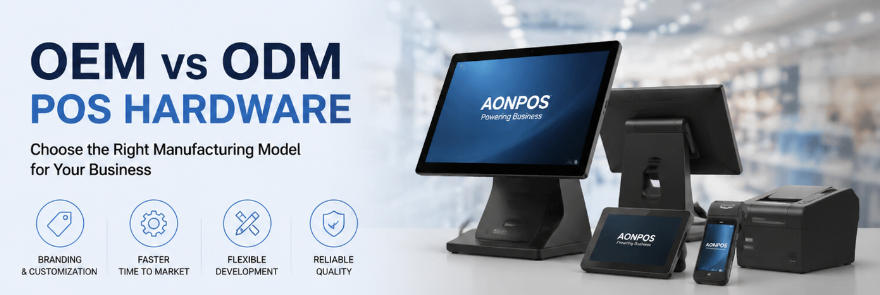
Launching or expanding a POS hardware product line involves much more than selecting a touchscreen, processor, and enclosure. For distributors, POS software companies, payment solution providers, system integrators, and retail technology brands, one of the earliest strategic decisions is whether to choose an OEM or ODM manufacturing model.
Although the terms OEM and ODM are often used together, they represent different levels of product ownership, customization, engineering responsibility, investment, and time to market. Choosing the wrong model can lead to unnecessary development costs, delayed launches, limited differentiation, or hardware that does not integrate properly with the intended software environment.
This guide explains the differences between OEM and ODM POS hardware, compares their advantages and limitations, and shows how buyers can determine which approach is best for their project.
What Is OEM POS Hardware?
OEM stands for Original Equipment Manufacturer. In the POS industry, OEM manufacturing generally means that a factory produces an existing or semi-standard POS terminal for another company, which then sells the product under its own brand.
The core platform has usually already been designed and tested by the manufacturer. Buyers select from available configurations and add branding or relatively straightforward modifications.
A typical OEM POS hardware project may include:
A custom logo on the terminal
Branded startup screens or BIOS settings
Customized packaging and manuals
Selected processor, memory, and storage configurations
A preferred operating system
Optional customer displays, MSR readers, NFC modules, or Wi-Fi
Regional power adapters and keyboard layouts
Customized product labels and serial numbers
For example, a POS software company may choose an existing 15-inch touchscreen terminal, configure it with a specific Intel processor, install its software image, add its logo, and package the device as part of a complete retail solution.
Because the basic design already exists, OEM projects are usually faster and less expensive than developing new hardware from the ground up.
Businesses evaluating standard and customizable terminals can begin by reviewing the AONPOS all-in-one POS system range, which includes multiple screen, processor, storage, and peripheral configurations.
What Is ODM POS Hardware?
ODM stands for Original Design Manufacturer. In an ODM project, the manufacturer provides deeper product design and engineering services based on the buyer’s technical, functional, and commercial requirements.
The starting point may still be an existing hardware platform, but the final product can involve significant changes to its appearance, structure, electronics, interfaces, functions, or internal layout.
ODM POS development may include:
A newly designed enclosure
Customized screen size or aspect ratio
Modified motherboard layouts
Special I/O port combinations
Integrated printers, scanners, NFC, or payment modules
Custom mounting structures
Unique colors, materials, and surface finishes
Thermal management changes
Waterproof or dust-resistant structures
Firmware and operating system customization
Product testing and certification support
Custom tooling and mold development
An ODM project is appropriate when a buyer wants a POS terminal that cannot be created through simple configuration changes.
For instance, a restaurant technology company may need a compact Android terminal with an integrated printer, a specific cable-management structure, and a customer-facing display positioned at a custom angle. A self-service solution provider may require a kiosk motherboard layout that supports particular peripherals and installation conditions.
ODM provides greater differentiation, but it also requires more engineering communication, validation, investment, and development time.
OEM vs ODM POS Hardware: The Main Differences
The easiest way to understand OEM and ODM is to compare how much of the product already exists before the buyer begins the project.
With OEM, the manufacturer already has a proven POS platform. The buyer primarily chooses specifications, branding, accessories, and packaging.
With ODM, the buyer requires a product that must be modified or designed to meet a more specific technical or commercial objective.
Product Design Ownership
OEM projects use the manufacturer’s existing design as the foundation. The buyer may own its branding, packaging, software image, and certain customized elements, but the base terminal platform usually remains part of the manufacturer’s product portfolio.
ODM ownership depends on the development agreement. Some projects use shared platform technology, while others involve buyer-funded tooling, exclusive mechanical structures, or project-specific designs.
Before starting an ODM program, both parties should clearly define ownership of mechanical drawings, molds, firmware, tooling, test fixtures, and any custom intellectual property.
Level of Customization
OEM customization is generally configuration-based. Buyers can often select:
CPU
RAM
SSD capacity
Windows, Linux, or Android
Single- or dual-screen layouts
Touchscreen type
Wireless connectivity
Built-in MSR or NFC
Logo placement
Packaging
ODM customization can extend to the product architecture itself. This may involve changing the enclosure, motherboard, cooling system, port arrangement, display mechanism, or integration method.
An existing product such as an AONPOS dual-screen touch POS terminal may be suitable for an OEM project when the standard structure already meets the application. A substantially different customer-display position, enclosure, or internal architecture may require an ODM approach.
Development Cost
OEM projects generally require less initial investment because the core development, tooling, and validation have already been completed.
The main costs usually include samples, branding, packaging preparation, configuration changes, software installation, and order production.
ODM projects may involve non-recurring engineering charges, industrial design, prototypes, molds, board modifications, firmware work, testing, certification, and pilot production.
The additional cost can be justified when the product creates a stronger market advantage, supports a large deployment, or solves a requirement that standard terminals cannot meet.
Time to Market
OEM is usually the faster path. Once configurations and branding materials are approved, a buyer can proceed to samples, testing, and mass production relatively quickly.
ODM requires additional stages:
Requirement analysis
Feasibility review
Industrial and mechanical design
Electronic engineering
Prototype production
Software and peripheral integration
Reliability testing
Pilot production
Certification
Mass production
The exact schedule depends on the complexity of the project. Buyers planning around a trade show, customer rollout, software release, or seasonal retail period should evaluate the timeline before choosing ODM.
Minimum Order Quantity
OEM usually supports lower minimum order quantities because the manufacturer can produce the same base platform for multiple customers.
ODM often requires a larger commercial commitment, especially when custom molds, unique components, or dedicated production processes are involved.
However, not every ODM project requires a completely new product. Some manufacturers use modular development, allowing buyers to customize selected components without redesigning the entire platform. This can reduce both MOQ and engineering cost.
Product Differentiation
OEM products can still be differentiated through branding, software, service, packaging, accessories, and market positioning. For many POS software providers, the software ecosystem and customer support are more important than having a unique enclosure.
ODM becomes valuable when physical differentiation is central to the business model. A distinctive design may improve brand recognition, simplify installation, support proprietary accessories, or address a specialized operating environment.
When Should You Choose OEM POS Hardware?
OEM is often the best choice when speed, cost control, and proven reliability are more important than creating a completely unique device.
You should consider OEM when:
You need to launch a branded POS product quickly.
Your software already works with standard Windows or Android hardware.
An existing screen size and enclosure meet your needs.
You require logo, packaging, and configuration customization.
Your initial order volume is moderate.
You want to test a new market before investing in custom tooling.
You need multiple hardware configurations for different customer segments.
OEM is especially practical for POS software developers. Instead of investing heavily in mechanical and electronic engineering, the software company can focus on application development, cloud services, payment integration, deployment, and customer support.
It is also suitable for distributors that want to build a private-label POS hardware range. They can offer entry-level, mid-range, dual-screen, and industry-specific terminals without developing every model independently.
Buyers comparing possible hardware specifications should also review the AONPOS guide to key factors in POS hardware selection, including processor, memory, storage, display, and connectivity considerations.
When Should You Choose ODM POS Hardware?
ODM is more appropriate when the commercial opportunity depends on a specialized product.
You should consider ODM when:
Standard terminals cannot satisfy your functional requirements.
The product needs a distinctive industrial design.
You need a special screen, stand, hinge, mounting system, or enclosure.
Multiple peripherals must be integrated into one device.
The installation environment has unusual space or durability requirements.
You require a specific motherboard or port layout.
You are preparing a large-scale or multi-year deployment.
Hardware design is an important part of your brand differentiation.
You have sufficient budget and time for engineering and testing.
ODM can be particularly useful for hospitality chains, self-service projects, embedded retail systems, unattended terminals, logistics operations, and specialized healthcare or industrial applications.
A mobile deployment, for example, may require a different design process from a desktop checkout station. A standard device such as the AONPOS S600 handheld POS terminal may satisfy the project through OEM configuration, while requirements involving a different battery structure, scanner position, cradle, or rugged enclosure could justify ODM development.
How to Choose Between OEM and ODM
The decision should begin with a written product requirement document rather than a general request for a “custom POS machine.”
Define the following before contacting a manufacturer.
1. Target Application
Clarify where the hardware will be used. A supermarket checkout, restaurant counter, mobile delivery route, hotel reception desk, and self-service kiosk have different requirements.
Transaction volume, available counter space, exposure to dust or liquids, operating hours, and cashier behavior all influence the design.
2. Software and Operating System
Confirm the operating system, processor architecture, driver requirements, screen resolution, and peripheral interfaces required by your software.
A visually attractive terminal is not useful if the software cannot communicate reliably with its printer, scanner, payment device, or customer display.
3. Required Interfaces
Create a complete I/O list covering USB, serial ports, LAN, HDMI, audio, cash-drawer ports, Wi-Fi, Bluetooth, and any specialized connectors.
Insufficient ports are one of the most common causes of integration problems in POS deployments.
4. Branding Requirements
Decide whether you need only a logo and custom carton or a fully differentiated product appearance.
Simple branding normally points toward OEM. Unique mechanical design, materials, lighting, or structural features may require ODM.
5. Expected Order Volume
Estimate sample quantities, initial production volume, annual demand, and potential growth.
A complex ODM investment may not be commercially reasonable for a small trial order. Conversely, a high-volume multi-year rollout may justify custom engineering that reduces assembly time, service costs, or installation complexity.
6. Certification Markets
Identify the countries where the product will be sold. Electrical safety, electromagnetic compatibility, wireless, environmental, and recycling requirements vary by market.
Certification planning should begin during product design rather than after mass production. Even an existing OEM model may need configuration review if wireless modules, power supplies, or internal components are changed.
7. Serviceability
POS hardware operates in business-critical environments. A terminal failure can stop transactions and affect customer service.
Evaluate how easily memory, storage, displays, power adapters, and other components can be replaced. Ask about spare-part availability, warranty procedures, repair documentation, and long-term component supply.
For industry-specific planning, the AONPOS grocery store POS hardware guide provides an example of how terminals, scanners, printers, cash drawers, and customer displays work together as a complete checkout solution.
Questions to Ask a POS Hardware Manufacturer
Whether you choose OEM or ODM, supplier evaluation should go beyond unit price.
Ask potential manufacturers:
Which parts of the product can be customized?
Which modifications require tooling or engineering fees?
What is the MOQ for each customization level?
Can the manufacturer provide engineering drawings and samples?
How are component changes controlled?
What reliability tests are performed?
Can the factory install and test your software image?
Which certifications are already available?
Can customized configurations be maintained for future orders?
What is the process for pilot production?
How are defects, repairs, and spare parts handled?
Who owns custom tooling and design files?
Can the product remain exclusive within a defined market?
What happens when a processor, motherboard, or display reaches end of life?
Clear answers to these questions help buyers distinguish a genuine manufacturing partner from a supplier that only performs basic product reselling.
How AONPOS Supports OEM and ODM Projects
AONPOS focuses on commercial POS hardware, including all-in-one touchscreen terminals, dual-screen POS systems, touch monitors, self-service products, handheld terminals, and cash-register peripherals.
For OEM projects, buyers can evaluate existing hardware platforms and select configurations based on software compatibility, performance, industry application, and target price. Depending on the selected model and project requirements, customization may include branding, packaging, operating systems, memory, storage, processors, displays, and integrated peripheral options.
For projects requiring deeper development, ODM cooperation can begin with application requirements, mechanical structure, functional modules, interface needs, target market, order forecast, and certification expectations.
Companies considering a branded all-in-one terminal can explore the AONPOS OEM all-in-one POS hardware solutions. Buyers can also review the broader AONPOS POS hardware portfolio to compare desktop, dual-screen, mobile, touch-display, and self-service product directions.
The most efficient development process is collaborative. Buyers should provide detailed software, interface, design, volume, and compliance requirements, while the manufacturer should provide realistic feedback on feasibility, cost, MOQ, testing, and production schedules.
Final Thoughts
OEM and ODM are not competing choices in which one is always superior. They are different manufacturing strategies for different business objectives.
OEM POS hardware offers a faster launch, lower development risk, proven platforms, and more accessible order quantities. It is ideal for software providers, distributors, and solution companies that can create value through branding, applications, integration, and customer service.
ODM POS hardware offers deeper differentiation and greater control over product form and functionality. It is suitable for businesses with specialized requirements, larger commercial opportunities, and the resources to manage engineering, prototypes, testing, certification, and production validation.
In many cases, the best approach is to start with OEM hardware, validate the market, collect customer feedback, and move toward ODM development once demand and requirements are clear.
By selecting the right manufacturing model—and working with an experienced POS hardware partner—businesses can reduce development risk, improve product-market fit, and build a scalable hardware portfolio that supports long-term growth.