All-in-One POS vs Modular POS: Which Hardware Architecture Fits Your Business?
Sep 16, 2026
Choosing POS hardware is not simply a matter of comparing processors, screen sizes, or prices. One of the most important decisions happens much earlier: should you build your checkout around an all-in-one POS or a modular POS system?
Both architectures can process the same transactions and run similar POS software, but they approach hardware deployment very differently.
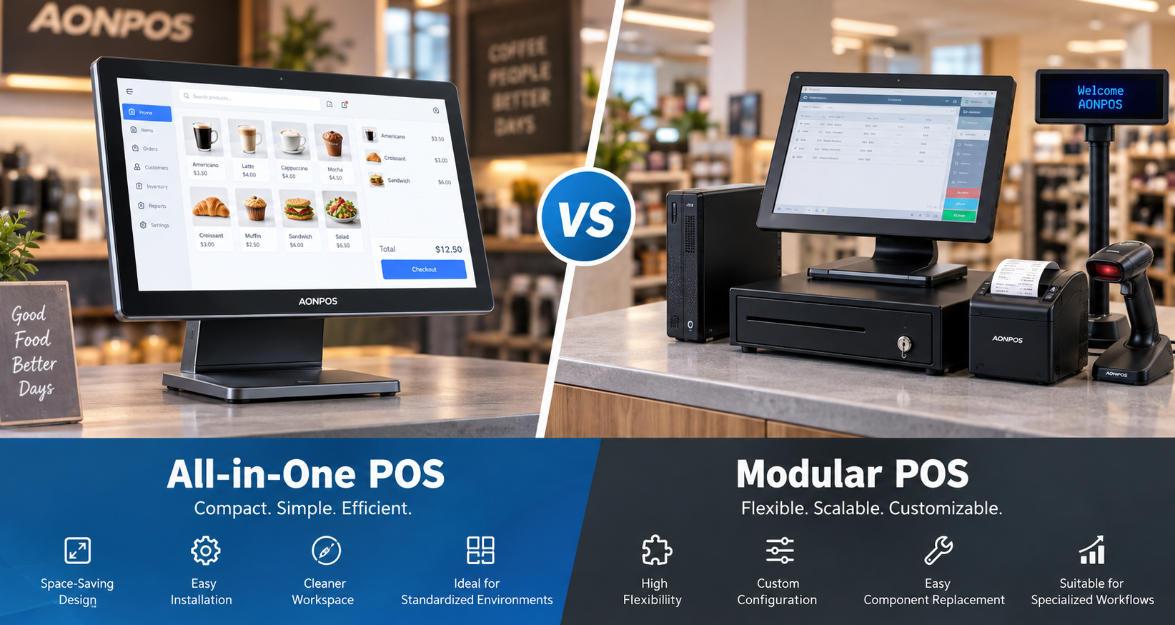
An all-in-one POS integrates the main computing hardware, touchscreen, connectivity, and sometimes additional functions into a compact terminal. A modular POS separates the terminal, display, printer, scanner, cash drawer, customer display, and other peripherals into independently connected components.
Neither approach is universally better.
The right choice depends on counter space, peripheral requirements, maintenance strategy, deployment scale, expected service life, and how frequently the hardware configuration may change.
For retailers, restaurants, POS distributors, software companies, and system integrators planning a new deployment, understanding these differences can prevent unnecessary hardware costs later.
All-in-One POS vs Modular POS at a Glance
Factor
All-in-One POS
Modular POS
Counter footprint
Compact
Usually larger
Installation
Simple
More components to install
Cable management
Cleaner
More cabling
Hardware flexibility
Moderate
High
Peripheral replacement
External devices are easy to replace
Individual components are easy to replace
Core terminal replacement
May involve replacing the main integrated unit
Individual computing/display components may be replaceable
Initial deployment
Usually straightforward
Can require more planning
Custom configuration
Available within platform options
Highly flexible
Visual consistency
Strong
Depends on component selection
Best suited to
Standardized checkout environments
Specialized or frequently changing workflows
The differences become more significant when hundreds or thousands of terminals are involved. A small change in installation time, spare-part strategy, cabling, or maintenance can have a meaningful impact across a large deployment.
1. Counter Space and Physical Design
Counter space is one of the strongest arguments for an all-in-one POS.
Retail counters, cafés, quick-service restaurants, salons, convenience stores, and reception desks often have limited room. Installing a separate computer, monitor, mounting hardware, and multiple peripheral devices can quickly create a crowded workspace.
An all-in-one POS consolidates the primary components into one enclosure.
This produces several practical advantages:
Smaller hardware footprint
Fewer visible cables
Cleaner counter appearance
Easier positioning
More consistent store design
Modern touchscreen POS terminals can also incorporate customer displays, MSR readers, Wi-Fi, and other functions without dramatically increasing the footprint.
A modular POS takes the opposite approach. Because components are separated, businesses have greater freedom over where each device is installed. A monitor can be mounted on an arm, the computer can sit underneath the counter, and printers or scanners can be positioned according to the workflow.
That flexibility is useful when checkout stations have unusual layouts, but it requires more installation planning.
For standard counters, all-in-one architecture usually simplifies physical deployment. For highly specialized counters, modular architecture gives system designers more freedom.
2. Installation and Deployment Complexity
Hardware installation becomes particularly important for chains, franchise networks, and large-scale rollouts.
Consider a deployment across 300 stores.
If every checkout requires a separate PC, touchscreen monitor, power supply, stand, peripheral hub, customer display, printer, scanner, and cable set, technicians must install and verify each component.
An all-in-one POS reduces the number of independent core components.
The terminal arrives as a more standardized hardware platform, allowing deployment teams to connect only the required peripherals. This can simplify staging, packaging, shipping, installation, and troubleshooting.
Businesses exploring standardized terminal configurations can review the AONPOS POS System range, which includes single-screen and dual-screen configurations for different commercial environments.
Modular systems require more work during deployment, but that complexity can be worthwhile when different locations require substantially different configurations.
A supermarket, for example, might require scanners, scales, customer displays, cash drawers, receipt printers, and payment devices. A specialist retailer may need RFID equipment or other industry-specific peripherals.
In these environments, flexibility can be more important than installation simplicity.
3. Peripheral Flexibility
This is where modular POS architecture becomes particularly attractive.
Businesses can select individual devices according to operational requirements rather than accepting a predefined hardware configuration.
A modular station might combine:
Touch monitor
Mini PC or POS box
Barcode scanner
Receipt printer
Cash drawer
Customer display
Payment terminal
Weighing scale
RFID reader
If the scanner needs to be upgraded, the business replaces the scanner. If a larger customer display becomes necessary, the display can be changed without redesigning the entire station.
However, the difference between modular and all-in-one POS is no longer absolute.
Modern all-in-one terminals typically provide multiple USB, serial, LAN, display, and other I/O options, allowing external peripherals to be added when required. An integrated terminal can therefore serve as the core of a relatively flexible POS ecosystem.
The real question is not whether an all-in-one POS can connect peripherals.
It is how much hardware flexibility your deployment actually needs.
If 90% of stores will use the same configuration for several years, additional modularity may provide little operational value. If hardware requirements vary significantly between stores, modular architecture becomes much more useful.
4. Maintenance and Repair Strategy
Maintenance is often overlooked during purchasing but becomes critical once hardware enters daily operation.
A modular system has an obvious advantage: components can often be replaced individually.
If the monitor fails, replace the monitor. If the computer fails, replace the computer. Technicians can potentially repair one part without removing the entire checkout station.
This can be valuable for organizations with internal IT teams, regional service centers, or established spare-parts inventories.
All-in-one POS terminals approach maintenance differently.
Because the computer and display are integrated, failure of a major internal component may require servicing or swapping the terminal. However, standardized terminals can also make replacement workflows easier.
Instead of diagnosing multiple independent components at the checkout counter, a technician can replace the main terminal with a prepared spare and service the faulty unit separately.
Therefore, modularity does not automatically mean easier maintenance.
The better architecture depends on the company's service model.
Organizations should evaluate:
Modular repair strategy: diagnose and replace individual components.
Terminal swap strategy: replace a standardized all-in-one terminal and repair it centrally.
For large deployments, the second approach can sometimes reduce on-site troubleshooting time.
5. Reliability and Cable Management
Every additional connector, cable, power adapter, and external device introduces another potential point of failure.
This does not mean modular POS systems are unreliable. Properly designed modular systems can operate extremely reliably.
But complexity matters.
Cables can loosen. Adapters can fail. Connectors can be damaged during cleaning or maintenance. Employees may accidentally disconnect peripherals.
All-in-one terminals reduce some of this physical complexity by integrating the main computing and display hardware.
The result can be particularly useful in busy environments where POS equipment operates continuously.
Thermal design should also be considered. Many modern POS terminals use fanless architectures to reduce moving components and dust intake. Businesses comparing cooling approaches can read AONPOS's guide to Fanless vs. Fanned POS Systems for a deeper look at how thermal architecture affects POS hardware deployment.
Reliability, however, should always be evaluated at the complete-system level rather than based solely on whether the POS is integrated or modular.
6. Upgradeability and Hardware Lifecycle
Modular POS systems generally provide greater upgrade freedom.
A business may replace its display while retaining the computer, upgrade the computing unit while retaining peripherals, or introduce a new scanner without changing other components.
This can extend the practical lifecycle of parts of the system.
All-in-one terminals require a different lifecycle strategy.
Instead of continuously changing individual core components, organizations often standardize a terminal configuration and operate it for a planned replacement cycle.
For example, a deployment might specify:
Intel J4125, Core i3, or Core i5 class processor depending on workload
8 GB memory
SSD storage
15-inch touchscreen
Required USB and serial connectivity
Optional customer display
The configuration can then remain consistent across locations.
AONPOS currently offers POS terminal configurations with different processor, memory, SSD, screen, and peripheral options, allowing buyers to match hardware to different software and workload requirements.
The important lesson is that upgradeability has value only when upgrades are actually expected.
Paying for maximum flexibility that will never be used can increase procurement and support complexity without creating meaningful business value.
7. Total Cost of Ownership
Purchase price alone provides an incomplete comparison.
A better evaluation includes total cost of ownership (TCO):
TCO = hardware + peripherals + deployment + maintenance + downtime + replacement + support
An all-in-one POS may reduce:
Number of core devices
Installation labor
Cabling
Packaging complexity
Counter mounting requirements
Deployment time
A modular POS may reduce:
Cost of individual component replacement
Cost of partial upgrades
Dependence on a specific integrated terminal design
Imagine a retailer that changes customer displays frequently but keeps the same POS computers. A modular system could provide better lifecycle economics.
Now consider a restaurant chain deploying identical terminals across hundreds of locations. Standardized all-in-one terminals may simplify purchasing, installation, training, inventory, and support.
The lowest hardware quotation therefore does not necessarily produce the lowest operational cost.
8. Scalability Across Multiple Locations
For multi-location businesses, consistency becomes increasingly valuable.
IT teams must manage:
Hardware specifications
Drivers
Operating systems
Peripheral compatibility
Spare units
Installation procedures
Support documentation
An all-in-one POS can reduce the number of hardware combinations IT teams need to maintain.
One standardized terminal platform can be deployed across multiple stores while selected peripherals are added according to location requirements.
Modular architecture provides greater local flexibility but can create configuration fragmentation if not carefully controlled.
For this reason, many larger deployments use a hybrid strategy.
The main POS terminal is standardized, while printers, scanners, customer displays, payment devices, and industry-specific peripherals remain modular.
This combines a consistent computing platform with enough flexibility for different workflows.
9. Customization for OEM and ODM Projects
For POS distributors, software providers, and solution integrators, the decision extends beyond standard retail deployment.
Hardware may need to support specific branding, software, interfaces, markets, or installation requirements.
Customization can include:
Housing design
Logo and color
Screen size
Single or dual displays
CPU platform
Memory and storage
I/O interfaces
MSR or customer display integration
Packaging
Operating system requirements
In this situation, the question becomes less about choosing a fixed all-in-one or modular design and more about determining which functions should be integrated and which should remain replaceable.
AONPOS supports configurable POS hardware and OEM/ODM projects for businesses that need different terminal specifications. Buyers planning specialized projects can also explore the guide to Custom POS Hardware to understand which hardware elements can be adapted to specific deployment requirements.
This approach is particularly relevant for POS software companies that need a consistent hardware platform to bundle with their applications.
Which Businesses Benefit Most from All-in-One POS?
An all-in-one POS is particularly suitable when the priority is a compact, standardized, easy-to-deploy checkout environment.
Typical applications include:
Restaurants and cafés where counter space is limited and fast installation is valuable.
Fashion and specialty retail where clean counter aesthetics contribute to store design.
Convenience stores requiring compact terminals with scanners, printers, and payment peripherals.
Franchise networks that need consistent hardware across many locations.
POS software providers looking for standardized hardware to package with their software solutions.
Dual-screen all-in-one terminals can also provide customer-facing information, advertising, loyalty content, or order confirmation without requiring a completely separate workstation.
When Does Modular POS Make More Sense?
Modular POS architecture becomes more attractive when hardware requirements are complex or likely to change.
Examples include:
Large supermarkets with scanners, scales, printers, cash drawers, payment terminals, and specialized checkout equipment.
Industrial environments where displays and computing hardware may need different mounting locations.
Businesses with internal IT teams that prefer component-level maintenance.
Specialized retail requiring RFID, weighing, identification, or other non-standard peripherals.
Long lifecycle deployments where individual components are expected to be upgraded at different times.
The important point is to avoid choosing modular hardware simply because it appears more flexible. Flexibility should solve a defined operational requirement.
The Hybrid Approach Is Increasingly Practical
The choice between all-in-one POS and modular POS does not have to be binary.
A practical modern architecture is often:
Integrated core + modular peripherals.
The touchscreen, processor, memory, storage, connectivity, and operating environment remain within a standardized all-in-one terminal, while external devices remain replaceable.
This can include the receipt printer, barcode scanner, cash drawer, payment terminal, customer display, and other specialized hardware.
Such an architecture provides many of the deployment advantages of an all-in-one POS while preserving the peripheral flexibility traditionally associated with modular systems.
For retailers and solution providers managing multiple hardware configurations, this balance can significantly simplify procurement and support.
Final Decision: Start with the Workflow, Not the Hardware
The most effective way to choose between an all-in-one POS vs modular POS is to map the checkout workflow before selecting equipment.
Ask:
How much counter space is available?
Which peripherals are required?
Will those peripherals change during the system's lifecycle?
Who will maintain the hardware?
How quickly must a failed station be restored?
Will the same configuration be deployed across multiple locations?
Does the POS software require specific ports or processors?
Will branding or OEM customization be required?
How long is the expected hardware lifecycle?
Once these questions are answered, the appropriate architecture usually becomes much clearer.
An all-in-one POS offers compact design, standardized deployment, simpler cable management, and a consistent hardware platform. A modular POS offers greater component-level flexibility, specialized configuration options, and independent upgrade paths.
For many modern deployments, the strongest solution sits somewhere between the two: a reliable all-in-one POS terminal serving as the standardized core, combined with modular peripherals selected according to each business workflow.
For distributors, retailers, restaurant chains, and POS software companies, AONPOS provides configurable touchscreen POS hardware with different CPU, memory, storage, display, and peripheral options, as well as OEM/ODM support. The objective should not be to integrate as much hardware as possible—or to make every component modular—but to build a POS architecture that remains reliable, serviceable, and cost-effective throughout its operational life.