SSD vs HDD for POS: Which Storage Is Better for Point-of-Sale Systems?
Aug 13, 2026Storage rarely receives as much attention as the processor, memory, touchscreen, or peripheral interfaces when businesses specify a new point-of-sale terminal. Yet the choice between an SSD and an HDD can have a direct influence on how responsive the POS feels, how well it tolerates continuous commercial use, and how much maintenance the system may require over its service life.
For a single checkout counter, the difference may appear relatively small on a specification sheet. Across dozens, hundreds, or thousands of terminals, however, storage decisions can affect boot times, software deployment, failure rates, field-service requirements, replacement inventory, and total cost of ownership.
For most modern retail and hospitality applications, SSD storage has become the more practical option. HDDs have not become completely irrelevant, but their advantages are concentrated in applications requiring relatively large amounts of inexpensive local storage rather than fast transaction processing.
For POS buyers, distributors, software companies, and system integrators, the more useful question is therefore not simply “Is SSD faster than HDD?”
It is:
Which storage configuration delivers the best balance of performance, reliability, capacity, cost, and lifecycle value for the actual POS deployment?
A POS terminal does much more than save transaction records.
During a normal shift, the storage subsystem may be involved in operating-system startup, application loading, database access, product searches, local inventory records, receipt generation, software updates, log files, temporary files, reporting, and synchronization with cloud or server-based systems.
Many of these operations involve numerous small file requests rather than long sequential transfers.
That distinction matters.
Traditional hard drives rely on mechanical components to locate and read data. Solid-state drives access data electronically without moving read/write heads. As a result, SSDs generally provide much lower access latency and substantially better random-access performance.
In practical POS operation, that can translate into:
Faster Windows startup
Shorter POS application launch times
More responsive product and inventory searches
Faster local database access
Quicker software updates
Better responsiveness when several applications operate simultaneously
A few seconds saved during one operation may not appear significant, but commercial checkout hardware performs these tasks repeatedly every day.
For stores that restart terminals each morning, operate multiple shifts, or need rapid recovery following a system reboot, storage responsiveness becomes an operational consideration rather than merely a benchmark number.
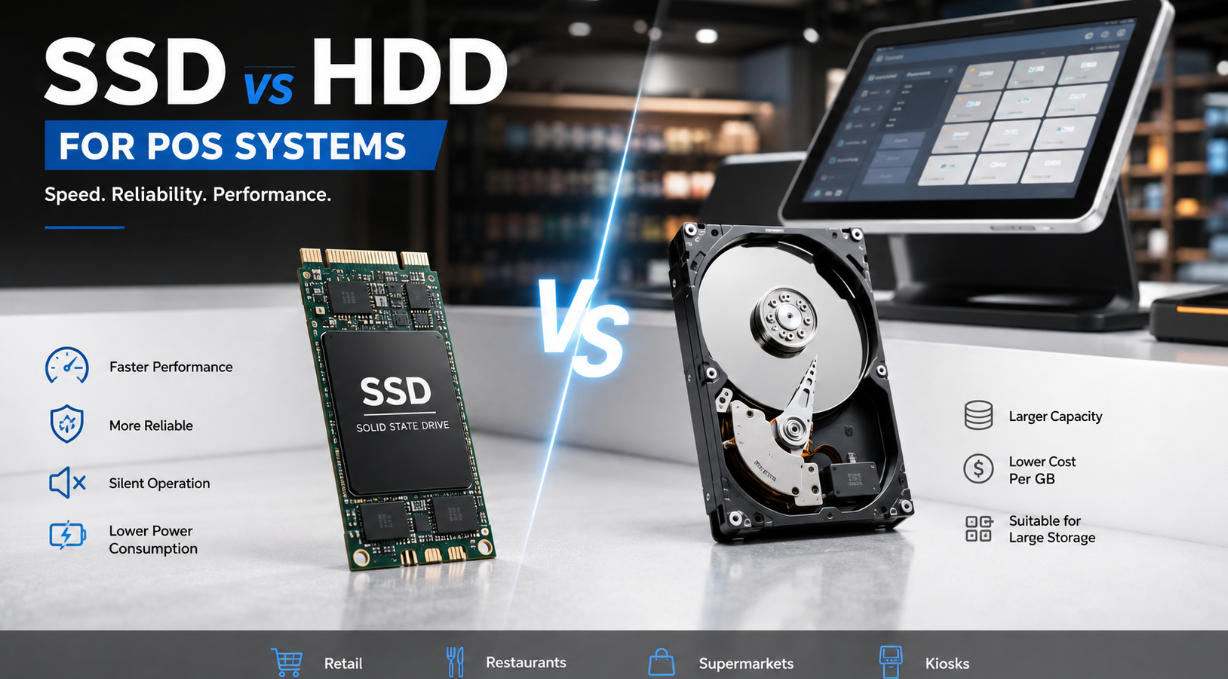
| Factor | SSD | HDD |
|---|---|---|
| Boot and application speed | Faster | Slower |
| Random data access | Excellent | Limited by mechanical movement |
| Moving parts | None | Yes |
| Resistance to vibration | Higher | Lower |
| Noise | Silent | Mechanical operating noise |
| Power consumption | Generally lower | Generally higher |
| Heat generation | Generally lower | Higher in many configurations |
| Capacity cost | Higher per GB | Lower per GB |
| Large local storage | More expensive | Economical |
| Suitability for modern POS | Excellent | Mainly specialized use cases |
The table makes SSD look like the obvious winner, but commercial hardware purchasing should rarely be based on one specification alone.
Capacity requirements, software architecture, workload, write volume, deployment environment, replacement strategy, and budget all deserve consideration.
Processor specifications often receive most of the attention when buyers compare POS systems, but the CPU is only one part of perceived system speed.
A capable processor combined with slow storage can still produce a system that feels sluggish.
When the operating system needs to retrieve libraries, the POS application accesses a local database, or reporting software opens transaction records, storage latency can become part of the delay experienced by the operator.
This is particularly relevant for Windows POS installations running several services simultaneously.
Businesses evaluating overall terminal performance should therefore consider CPU, RAM, and storage as one configuration rather than three unrelated specifications. For processor selection specifically, the AONPOS guide to the Best CPU for POS Systems provides additional guidance on matching processor performance to actual checkout workloads.
A high-end processor does not automatically compensate for inadequate memory or slow storage.
Balanced specifications usually provide better value.
One of the strongest arguments for SSD storage in POS hardware has little to do with speed.
It is mechanical simplicity.
An HDD contains spinning platters, motors, and moving read/write heads. These components operate extremely precisely, but they also make the drive more sensitive to vibration and physical shock than solid-state storage.
A checkout terminal may not appear to be a harsh industrial environment, yet everyday commercial installations can expose hardware to repeated physical stress.
Counters vibrate. Cash drawers open and close. Equipment is moved during cleaning. Terminals are repositioned. Kiosks may operate in busy public locations. Hardware shipped between branches may experience additional handling.
Because an SSD has no mechanical read/write assembly, these conditions present less mechanical risk to the storage device.
That characteristic is particularly valuable for compact all-in-one POS terminals and self-service hardware where reliability and limited maintenance access are priorities.
Modern POS terminals increasingly emphasize compact construction, low noise, and simplified thermal design.
Storage contributes to that equation.
Mechanical HDDs consume power to rotate their platters and operate the actuator mechanism. They also generate heat and some level of vibration and acoustic noise.
An SSD operates silently and typically requires less power.
Individually, the difference in power consumption may not transform operating costs. Its greater value appears at the system-design level.
Lower-power components are easier to integrate into compact commercial terminals where airflow is limited. This becomes especially relevant in fanless or low-noise systems designed for restaurants, cafés, boutiques, pharmacies, reception desks, and other customer-facing environments.
Reducing mechanical components also supports the broader goal of simplifying the hardware architecture.
For buyers comparing complete terminals rather than individual components, the AONPOS POS System range includes different screen sizes and configurable processor, memory, and storage combinations for commercial applications.
If SSD performs better in so many areas, why consider an HDD at all?
Capacity cost.
For applications requiring hundreds of gigabytes or several terabytes of local storage, HDDs can still provide considerably more capacity for a given hardware budget.
That can matter when a terminal is being used for more than conventional transaction processing.
Possible examples include systems that retain:
Large local multimedia libraries
Extensive historical databases
Locally stored surveillance footage
Large offline product image catalogs
Long-term archives
Other data-intensive applications
But this requirement should be verified carefully.
Many modern POS installations store relatively little data locally because transactions, reports, product databases, and analytics are synchronized with a local server or cloud platform.
Installing a 500GB or 1TB drive makes little economic sense if the terminal will use only a fraction of it during its entire deployment.
Capacity should be based on the actual storage architecture, not the assumption that more gigabytes automatically make a POS terminal better.
There is no universal answer because POS software packages vary significantly.
Nevertheless, buyers can divide requirements into several practical categories.
A 64GB SSD may be sufficient for highly controlled installations running a lightweight operating environment and limited local applications.
However, buyers should account for operating-system updates, temporary files, logs, database growth, and future software requirements.
Selecting capacity based only on the initial installation footprint leaves little margin for expansion.
For many conventional Windows-based retail and restaurant terminals, 128GB provides a useful balance between cost and available space.
It can accommodate the operating system, POS software, local database files, updates, logs, and normal operational growth without paying for large amounts of unused storage.
A 256GB configuration makes sense when the terminal runs additional business applications, stores larger local databases, needs more offline content, or is expected to remain in service for several years with changing software requirements.
It can also simplify hardware standardization.
Instead of maintaining separate storage configurations for several customers or software packages, an OEM buyer may specify one larger capacity that covers a broader range of deployments.
That convenience must still be weighed against the additional unit cost when ordering hardware at scale.
While the lack of mechanical components is an important SSD advantage, professional buyers should avoid assuming that every SSD is equally reliable.
Flash storage has finite write endurance. SSD quality can also differ depending on the controller, NAND type, firmware, thermal behavior, and manufacturing quality.
Fortunately, a normal POS workload is not the same as a high-write enterprise database server.
Most retail terminals primarily execute moderate database updates, operating-system activities, logs, application files, and transaction records. A correctly specified commercial SSD can therefore provide an appropriate service life for typical POS usage.
Still, system integrators deploying specialized workloads should calculate their requirements.
A terminal continuously writing large video files, for example, creates a very different storage workload from a checkout station processing receipts and synchronizing transaction records.
The important purchasing principle is simple:
Choose storage according to workload rather than technology labels alone.
Storage should not be evaluated solely by acquisition price.
Consider a chain operating 300 POS terminals.
If a storage failure requires a technician to visit a store, the actual cost may include much more than a replacement drive:
Technical support time
Technician travel
Store employee disruption
Hardware replacement
Software reinstallation
System reconfiguration
Data restoration
Lost checkout capacity
For locations with only one or two checkout stations, hardware downtime can be particularly disruptive.
This is where total cost of ownership becomes more important than component price.
An HDD might save money in the original bill of materials, but if the storage configuration increases maintenance requirements during a three- to five-year deployment, the original saving can quickly become insignificant.
For distributors and OEM buyers, this issue becomes even more important because hardware failures can also create warranty claims, international shipping costs, customer dissatisfaction, and additional support workload.
Storage performance also matters before a terminal reaches the checkout counter.
System integrators frequently need to install operating systems, clone system images, deploy POS applications, apply updates, and configure terminals in batches.
Faster storage can shorten these processes.
Consider an integrator preparing 200 terminals for a retail rollout. Saving several minutes per device during imaging, software installation, updates, and testing can translate into meaningful labor savings across the project.
The same benefit applies to recovery.
When a terminal must be restored from an image or updated after maintenance, faster storage helps reduce the amount of time required before the device returns to service.
This rarely appears on a product specification sheet, yet it can be important for companies managing large hardware fleets.
The preferred storage technology can also vary by application.
Restaurants and cafés: SSD is generally the stronger choice because fast startup, silent operation, resistance to everyday vibration, and responsive software performance align well with busy service environments.
Retail stores: SSD suits most deployments, particularly where terminals access inventory databases, CRM functions, promotions, and cloud services.
Supermarkets: SSD is attractive for high-transaction checkout lanes where reliability and rapid recovery are important across a large number of terminals.
Self-service kiosks: SSD is usually preferable because kiosks may operate for long periods with limited direct staff supervision.
Warehouses or specialized data-heavy terminals: HDD may still be considered if exceptionally large amounts of inexpensive local storage are required, although a larger SSD may remain preferable when reliability and response time are higher priorities.
In other words, HDD should generally be selected because the application has a genuine capacity requirement—not simply because the drive costs less.
Storage decisions become more complex when purchasing POS hardware at scale.
A distributor ordering 500 or 1,000 terminals is not simply choosing between two drives. The storage specification becomes part of inventory planning, product positioning, software compatibility, warranty management, and long-term supply consistency.
OEM and ODM buyers should therefore define at least:
Storage interface
Required capacity
Expected operating system
POS application size
Local database requirements
Expected write workload
Required lifecycle
Upgrade strategy
Target unit cost
Data-retention requirements
They should also avoid over-specification.
If a project requires only 128GB, installing 512GB solely because it appears more attractive on a product sheet adds cost without necessarily producing a measurable business benefit.
At the same time, specifying too little storage can create future problems as operating systems and POS applications grow.
The objective is not maximum specification.
It is appropriate specification.
AONPOS develops configurable commercial POS hardware for retailers, restaurants, distributors, POS software companies, and system integrators. Storage can be matched with processor, RAM, display, peripheral, and interface requirements according to the intended deployment.
For example, the AONPOS AP14 Desktop All-in-One POS Terminal publicly lists mSATA SSD capacities of 32GB, 64GB, 128GB, and 256GB alongside optional Intel J4125, Core i3, and Core i5 processors. This illustrates an important principle in professional POS procurement: storage should be configured as part of the complete hardware platform rather than selected independently.
A lightweight checkout application may work efficiently with a modest processor and storage configuration. A more demanding restaurant, retail, or multi-application deployment may benefit from additional CPU performance, memory, and SSD capacity.
For OEM/ODM projects, this configurability also enables buyers to create different product tiers without redesigning the entire POS platform.
For most new POS deployments, SSD is the better storage choice.
Its advantages extend beyond headline read and write speeds. Faster boot times, responsive application access, absence of moving parts, better resistance to vibration, silent operation, lower power requirements, compact integration, and potentially simpler maintenance all align closely with the requirements of modern commercial POS hardware.
HDD remains relevant where very large amounts of inexpensive local storage are genuinely necessary. But that is increasingly a specialized requirement rather than the standard POS use case.
For buyers specifying new hardware, the best approach is therefore:
Choose the smallest SSD capacity that comfortably supports the operating system, POS software, local data, future updates, and reasonable growth throughout the expected service life of the terminal.
Then evaluate that storage together with processor, memory, thermal design, display, connectivity, and peripherals.
A POS terminal is only as effective as the complete hardware configuration supporting it.
For distributors, system integrators, software providers, and retailers planning new deployments, AONPOS offers configurable all-in-one POS hardware that can be adapted to different performance, storage, display, and peripheral requirements—helping businesses build systems around real operational needs rather than specifications that look impressive but add little practical value.
Tel / Whatsapp : +86 -15999943922
Email : nikki@aonpostech.com


© 2026 Shenzhen Aonpos Technology Co., Ltd .All Rights Reserved