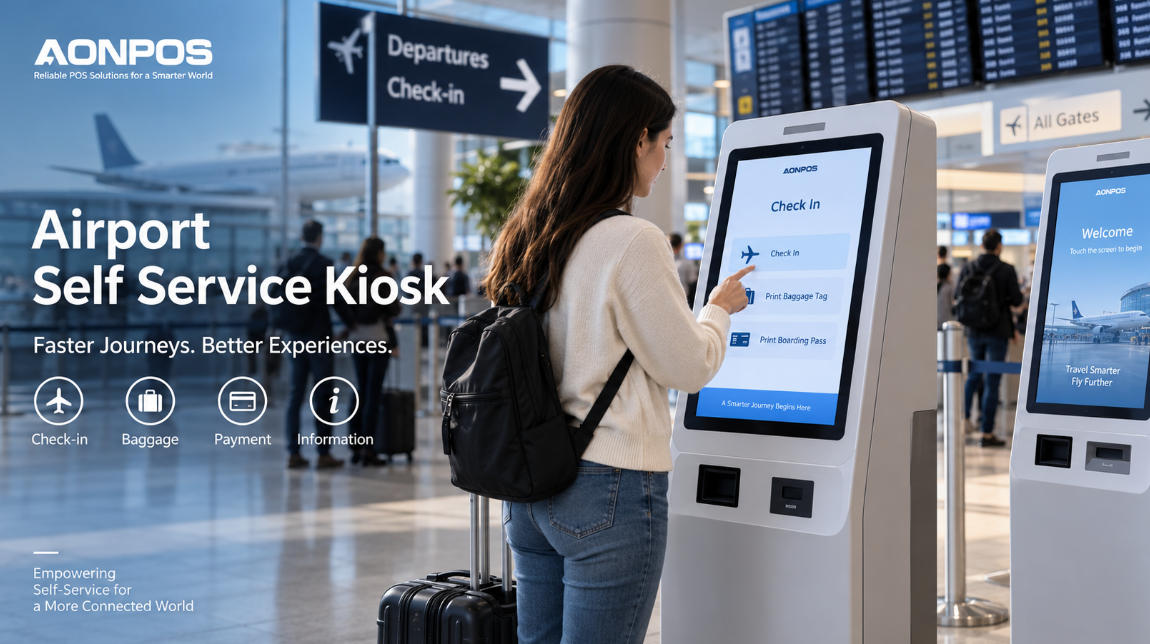
Airport Self Service Kiosk: Building Faster, More Reliable Passenger Service
Sep 10, 2026
Airports operate under a unique combination of pressure: large passenger volumes, strict schedules, complex security requirements, multilingual travelers, and service demand that can change dramatically within minutes. During peak departure periods, even a small bottleneck at check-in, ticketing, baggage processing, or information counters can quickly create long queues.
This is one reason the airport self service kiosk has become an increasingly important part of modern airport infrastructure.
Rather than depending entirely on staffed counters, airports and airlines can use self-service terminals to distribute routine passenger interactions across multiple service points. Travelers can check in, retrieve booking information, print documents, scan codes, make payments, or access travel information independently.
However, an airport kiosk should not be treated as simply a touchscreen placed in a terminal. Successful deployments depend heavily on hardware architecture, peripheral integration, reliability, accessibility, software compatibility, and long-term maintainability.
For airport operators, system integrators, airlines, and kiosk solution providers, choosing the right hardware platform is therefore a strategic decision.
Why Airport Self Service Kiosks Matter
Passenger traffic rarely arrives at a constant rate.
Morning departure waves, holiday travel, weather disruptions, delayed flights, international connections, and major events can cause sudden increases in demand. Traditional staffed counters have limited flexibility because increasing service capacity normally requires additional employees and physical counter space.
Self-service kiosks create another service layer.
Instead of every traveler joining the same queue, passengers with relatively simple requirements can complete tasks independently. Staff can then concentrate on situations that genuinely require human assistance, such as complex itinerary changes, documentation issues, accessibility support, or irregular operations.
This does not necessarily mean replacing airport staff.
In many environments, the most effective approach is hybrid: employees handle exceptions while kiosks process repetitive, standardized tasks.
The result can be a more flexible passenger-processing environment in which airports can increase service capacity without continuously expanding traditional service desks.
Common Applications of Airport Self Service Kiosks
The term airport kiosk covers several different applications. Although the enclosure may appear similar, the hardware configuration can change considerably depending on the workflow.
Self-Service Check-In
Check-in remains one of the most recognizable airport kiosk applications.
Passengers can typically enter a reservation number, scan a passport or travel document, scan a QR code, select a flight, confirm passenger details, and complete the check-in process.
Depending on the airline system, the terminal may also support seat selection, travel information review, or boarding document printing.
The main hardware requirements usually include a responsive touchscreen, scanner, printer, network connectivity, and sufficient processing power to run the airline application smoothly.
Boarding Pass and Document Printing
Printing remains important even as mobile boarding passes become more common.
Passengers may need paper boarding passes, baggage-related documents, receipts, itinerary information, or other printed material.
A thermal printer integrated into the kiosk can provide fast output while keeping the overall hardware footprint relatively compact.
For airport environments, however, printer selection should consider more than printing speed. Paper capacity, cutter reliability, maintenance access, sensor accuracy, and replacement convenience can significantly affect kiosk uptime.
Baggage Processing
Self-service baggage workflows typically require more specialized integration.
A passenger may first identify the booking through a passport, boarding pass, barcode, or QR code. The system can then retrieve flight information and guide the passenger through the baggage process.
Depending on the deployment, additional hardware such as printers, scanners, cameras, scales, or external baggage equipment may be required.
This demonstrates why modular kiosk design is particularly valuable in airports: different applications require different combinations of peripherals.
Ticketing and Additional Service Payments
Airport kiosks may also support paid services.
Depending on the airline or airport system, passengers could purchase upgrades, baggage allowance, lounge services, transportation tickets, or other ancillary services.
These applications require secure integration with payment devices such as card readers, NFC terminals, or QR payment systems.
A modular hardware platform makes it easier for integrators to adapt payment configurations to regional requirements rather than developing an entirely different kiosk for every market.
Wayfinding and Passenger Information
Not every airport self service kiosk is transaction-focused.
Interactive information terminals can help passengers search for gates, airline counters, airport facilities, restaurants, transportation services, baggage claim areas, or terminal maps.
Because international airports serve passengers from many countries, multilingual interfaces are especially important.
Large touch displays can also combine passenger information with digital advertising or airport service promotion, allowing the same physical terminal to support both operational and commercial objectives.
The Hardware Architecture Behind a Reliable Airport Kiosk
Airport kiosks operate differently from ordinary office computers or consumer tablets.
They may run for long periods every day, receive hundreds or thousands of interactions, and operate in high-traffic public spaces. Hardware must therefore be selected for continuous commercial use.
A practical airport kiosk architecture normally includes several core elements.
Touchscreen Display
The touchscreen is the primary passenger interface.
For standing kiosk applications, larger screens can improve readability and make multilingual interfaces easier to navigate. Capacitive touch technology is particularly suitable for interfaces requiring fast response and familiar smartphone-style interaction.
AONPOS, for example, offers modular self-service kiosk hardware with screen sizes including 15.6, 18.5, 21.5, and 23.8 inches, allowing system integrators to select a format based on application and installation requirements. AONPOS Modular Self Service Kiosk
Screen size should nevertheless be selected according to the workflow rather than simply choosing the largest available display.
A check-in kiosk may prioritize clear form entry, while an information kiosk may benefit from more display space for terminal maps and navigation.
Computing Platform
Airport applications can range from relatively lightweight browser-based interfaces to more demanding applications involving payment processing, camera input, document scanning, and multiple external devices.
Processor choice should therefore match the software workload.
Entry-level ARM platforms may be sufficient for simple information terminals, while Intel-based platforms may be preferable when Windows applications, multiple peripherals, or heavier software workloads are required.
Memory and storage should also leave room for future software updates rather than being specified only for the initial application.
Barcode and QR Scanner
Scanning is central to many airport workflows.
Passengers may present boarding passes, mobile QR codes, booking confirmations, baggage labels, or other machine-readable documents.
The scanner should therefore support fast recognition from both printed material and smartphone screens.
Placement is equally important. A scanner can be technically powerful but still create poor user experience if passengers cannot easily understand where or how to present their code.
Printer
Airport printing requirements vary widely.
Some kiosks only produce receipts, while others may need boarding passes, baggage-related documents, or tickets.
Integrators should evaluate paper width, cutter mechanism, roll capacity, print head life, sensor design, and ease of maintenance.
In high-volume airport environments, simple maintenance access can be just as important as the printer specification itself.
Card Reader and NFC
Where payment is required, card and contactless payment modules may become part of the kiosk configuration.
Support for NFC can also be useful in applications involving contactless identification, cards, or mobile devices.
Because payment standards differ between markets and acquiring environments, kiosk manufacturers should ideally allow payment hardware to be configured separately from the core terminal.
Camera and Identification Devices
Some airport applications may require cameras for identity verification, document capture, video assistance, or other passenger-processing functions.
More advanced deployments may integrate passport readers, biometric peripherals, microphones, or specialized sensors.
These requirements reinforce the value of an open and modular hardware platform rather than a fixed-purpose machine.
Why Modular Design Is Especially Important in Airports
Airport projects rarely use exactly the same configuration everywhere.
One terminal may require a printer and scanner. Another may need a payment reader. Another may function purely as an interactive information terminal.
Even two airlines operating in the same airport may use completely different software and peripheral requirements.
A modular self-service kiosk architecture allows system integrators to start with a common hardware platform and configure peripherals according to each application.
AONPOS positions its self-service payment kiosk family around this type of modular approach, combining touch displays with optional printers, scanners, card readers, cameras, NFC modules, stands, and multiple installation options. Explore AONPOS self-service kiosk solutions
For airport projects, this can simplify procurement and fleet management.
Instead of maintaining many unrelated kiosk designs, operators may be able to standardize the underlying computing and enclosure architecture while adjusting peripheral configurations for different service areas.
Reliability Matters More Than Specification Sheets
Airport technology is highly visible.
When a kiosk fails in a quiet retail environment, the impact may be inconvenient. When dozens of passengers are trying to check in shortly before departure, the consequences can be far more serious.
Reliability therefore needs to be considered at system level.
A powerful processor does not compensate for an unreliable printer. A high-resolution screen does not help if the scanner repeatedly fails to read mobile codes. A well-designed enclosure is insufficient if maintenance staff cannot quickly access internal components.
Procurement teams should evaluate:
touchscreen durability;
thermal management;
power stability;
connector security;
printer and scanner lifecycle;
enclosure strength;
cable management;
replacement-part availability;
maintenance accessibility;
long-term component consistency.
For large deployments, spare-part standardization can significantly simplify maintenance.
Using the same core components across multiple kiosk configurations allows service teams to stock fewer replacement parts and train technicians on fewer hardware platforms.
Connectivity and Backend Integration
An airport kiosk rarely works as an isolated machine.
It typically connects to airline systems, airport networks, payment platforms, databases, cloud services, or third-party middleware.
Reliable Ethernet remains important for fixed installations, while Wi-Fi or cellular connectivity may provide additional flexibility depending on the deployment.
Hardware should also provide sufficient external interfaces for scanners, printers, payment terminals, cameras, and other peripherals.
AONPOS's modular APK06 platform, for example, lists USB, RJ45, Wi-Fi and additional communication options alongside configurable peripheral integration.
For system integrators, I/O availability should be checked early in the project.
Adding peripherals late in development can create unnecessary engineering problems if the computing platform does not provide enough ports, power capacity, or driver compatibility.
Physical Design and Passenger Experience
Industrial design has a direct effect on usability.
Airport passengers may be carrying luggage, traveling with children, unfamiliar with the local language, or under significant time pressure. A kiosk should therefore make interaction obvious.
Screen height and angle should support comfortable viewing. Scanners, printers, payment readers, and document slots should be clearly visible. Instructions should match the physical position of each device.
Accessibility must also be considered from the beginning rather than added after the enclosure is complete.
Depending on the destination market and project requirements, this can affect screen placement, reach ranges, audio features, physical controls, interface design, and installation height.
Floor-standing, desktop, and wall-mounted kiosk formats may all have value depending on available airport space.
Customization for Airlines, Airports, and System Integrators
For many projects, an off-the-shelf kiosk is only a starting point.
Airlines may require branded colors and logos. Airport operators may specify enclosure materials, installation dimensions, cable routes, mounting points, or security features. Software companies may need particular motherboards, interfaces, scanners, printers, or payment terminals to match an existing platform.
This is where OEM and ODM manufacturing becomes relevant.
AONPOS has operated as a Shenzhen-based POS and kiosk hardware manufacturer since 2012 and describes its business around OEM/ODM development of POS terminals, kiosk POS equipment and related peripherals.
Businesses planning private-label or project-specific terminals can also refer to AONPOS's guide to OEM self service kiosk manufacturing, which covers enclosure design, peripheral integration, payment configurations, software compatibility, production and customization considerations.
For airport projects, OEM customization may include:
enclosure dimensions and appearance;
airline or airport branding;
touchscreen size;
processor and operating system;
RAM and SSD capacity;
printer configuration;
1D/2D scanner integration;
NFC or card reader mounting;
camera or microphone integration;
custom I/O layouts;
floor, desktop or wall installation;
peripheral brackets and internal cable management.
The objective should not be customization for its own sake. Good customization simplifies deployment, improves passenger usability, and reduces the engineering work required by the software or integration partner.
What Buyers Should Evaluate Before Ordering Airport Kiosks
Airport kiosk procurement should begin with the workflow, not the enclosure.
First define exactly what the passenger must accomplish. Then identify the hardware needed at every stage of that interaction.
Buyers should also consider expected passenger volume, operating hours, required operating system, connectivity, peripheral drivers, printing frequency, payment requirements, maintenance procedures, and local compliance requirements.
Pilot testing is particularly valuable.
A small deployment can reveal usability problems, scanner positioning issues, printer servicing difficulties, software compatibility problems, or enclosure changes before hundreds of units enter production.
For OEM and ODM buyers, manufacturing consistency should also be evaluated. Airport projects often expand gradually, meaning hardware purchased in later production batches should remain compatible with the original software image, mounting system, peripherals, and replacement parts whenever possible.
A More Scalable Passenger Service Infrastructure
The role of the airport self service kiosk is evolving.
It is no longer simply a machine for printing boarding passes. Modern kiosks can become flexible passenger-service endpoints capable of supporting identification, check-in, information access, document printing, scanning, payments, ticketing, and other digital airport services.
The most successful projects are therefore built around adaptable hardware rather than a single fixed function.
For airports, airlines, software developers, and system integrators, the right kiosk platform can provide a standardized physical foundation while allowing different software and peripheral combinations to serve different passenger journeys.
With modular touchscreen terminals, configurable computing platforms, multiple peripheral options and OEM/ODM customization capabilities, AONPOS provides hardware that can be adapted to transportation and airport self-service projects.
Ultimately, the value of an airport self service kiosk is not measured by how impressive the machine looks when it is installed.
It is measured by how reliably it works during the busiest hour of the day—when hundreds of passengers need the same service quickly, independently, and without unnecessary friction.