Android vs. Windows Self-Service Kiosks: Which Is Right for Your Business?
Dec 28, 2025
In the modern landscape of retail and hospitality, the choice of a self-service kiosk is no longer just about the screen size—it is about the "brain" powering the experience. As businesses transition to automated checkout, the debate between Android-based and Windows-based systems has become a pivotal decision for ROI.
At AonPostech, we provide industrial-grade hardware for both ecosystems. Here is a deep dive into the technical and operational differences to help you choose.
1. Technical Architecture & Performance
The primary difference lies in the hardware architecture and processing power.
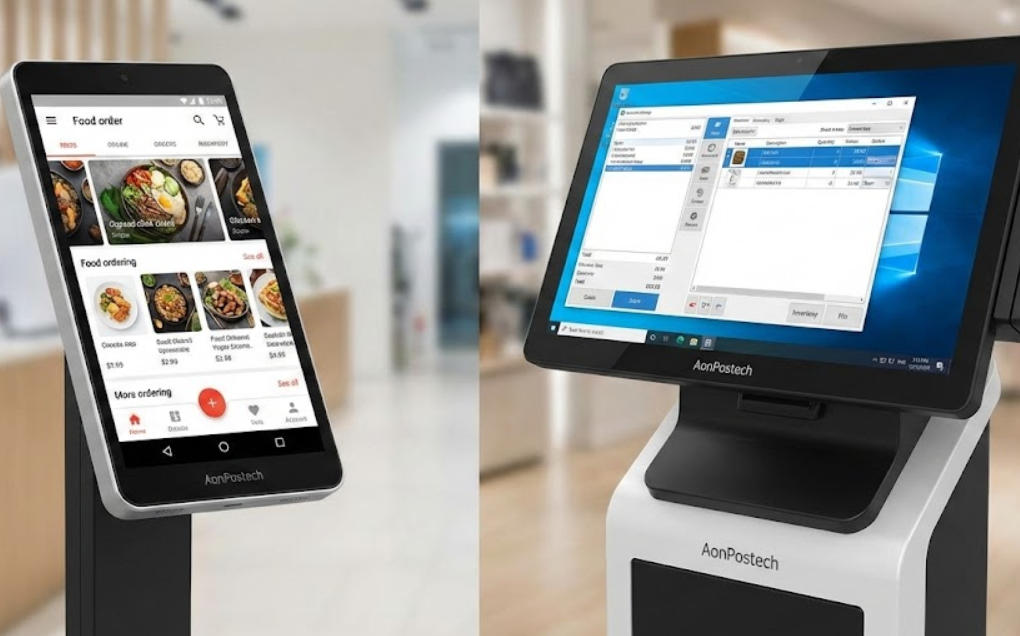
Android Kiosks: Typically powered by ARM-based processors (like the Rockchip RK3568 found in our APK06 series). They are highly energy-efficient, generate less heat, and offer a "mobile-native" feel that mirrors the smartphones your customers use daily.
Windows Kiosks: Utilize x86 architecture (Intel Core i3/i5/i7). These are "powerhouse" machines designed for heavy multitasking. If your kiosk needs to run complex local databases or high-end graphics alongside a POS system, Windows is the industry standard.
2. Total Cost of Ownership (TCO)
When scaling a fleet of kiosks, cost is a major factor.
Android: Generally offers a lower entry price. Since the OS is open-source, there are no heavy licensing fees. Maintenance is often streamlined via Mobile Device Management (MDM) software.
Windows: Requires a paid license (Windows 10 IoT or Pro). While the upfront cost is higher, Windows offers a longer lifecycle for industrial models—often 5 to 7 years of stable operation in high-traffic environments.
3. Comparison Table: At a Glance
Feature
Android (e.g., AonPostech RK3568)
Windows (e.g., Intel i5 Series)
Best For
QSR, Ticketing, Simple Retail
Pharmacy, Grocery, Legacy ERP
User Interface
Intuitive, Touch-First
Powerful, Multi-Window
Licensing
Low to None
High (Standard License Fees)
Connectivity
Cloud-Native, Bluetooth/Wi-Fi
Legacy USB, Serial, On-Premise
Security
App Sandboxing
Enterprise-Grade (Active Directory)
Why Hardware Quality Matters: The AonPostech Advantage
Regardless of the OS, the hardware must be built for 24/7 "Always-On" reliability. AonPostech kiosks, such as the AP022 and APK06, are engineered with:
Modular Design: Swap printers, scanners, or NFC modules in minutes without replacing the whole unit.
Industrial Cooling: Aluminum alloy and ABS plastic chassis prevent thermal throttling, a common cause of system crashes in "budget" consumer-grade kiosks.
High-End Peripherals: Integrated 80mm thermal printers and high-sensitivity QR scanners ensure a zero-friction checkout.
Frequently Asked Questions (FAQ)
Is Android or Windows more secure for handling payments?
Both are secure, but they handle data differently. Android uses "sandboxing," which isolates the payment app from the rest of the system, making it very hard for malware to spread. Windows offers deeper integration with enterprise security tools like Windows Defender and BitLocker, which is preferred by IT departments managing large corporate networks.
Can I run my current Windows POS software on an Android kiosk?
No, they are built on different codebases. However, most modern software providers now offer web-based or cloud-native versions of their POS, which run perfectly on Android systems. If you have a legacy system that must run locally, a Windows-based model like the AonPostech PK1851 is the correct choice.
Which system is easier to maintain remotely?
Android is the winner for remote management. Using MDM tools, you can push app updates, lock the screen into "Kiosk Mode," and troubleshoot devices across thousands of locations from a single dashboard. While Windows supports remote desktop and Group Policy, it often requires more technical expertise to manage at scale.
Do AonPostech kiosks support customization?
Yes. We specialize in OEM/ODM services. Whether you need a 15.6-inch desktop unit or a 32-inch floor-standing ordering terminal, we can customize the CPU, RAM, and peripheral modules to fit your specific OS choice and branding.
Final Verdict: Which should you choose?
Choose Android if you are a Quick Service Restaurant (QSR) or boutique retail store looking for a cost-effective, sleek, and easy-to-manage solution.
Choose Windows if you are a large-scale enterprise with complex security requirements or need to integrate with legacy hardware that requires specific Windows drivers.
Ready to upgrade your customer experience? Explore the AonPostech Kiosk Range to find the perfect match for your business.