
Pharmacy POS Hardware Buying Guide: How to Build a Reliable Pharmacy Checkout System
Jul 15, 2026A pharmacy requires more than a standard cash register. In addition to processing everyday retail transactions, a pharmacy checkout station may need to handle prescription pickups, over-the-counter products, membership programs, insurance-related workflows, barcode-based inventory, customer identification, and multiple payment methods.
The right pharmacy POS hardware provides a stable foundation for these operations. It helps pharmacists and cashiers complete transactions efficiently, reduces scanning and data-entry errors, and supports the pharmacy’s software, inventory, and customer-service processes.
However, pharmacy owners, system integrators, software companies, and equipment distributors must evaluate more than screen size or processor specifications. Hardware reliability, peripheral compatibility, hygiene, serviceability, and long-term availability can all affect the total value of a pharmacy POS deployment.
This pharmacy POS hardware buying guide explains the essential components, specifications, and purchasing considerations for independent pharmacies, hospital pharmacies, health and beauty retailers, and multi-location pharmacy chains.
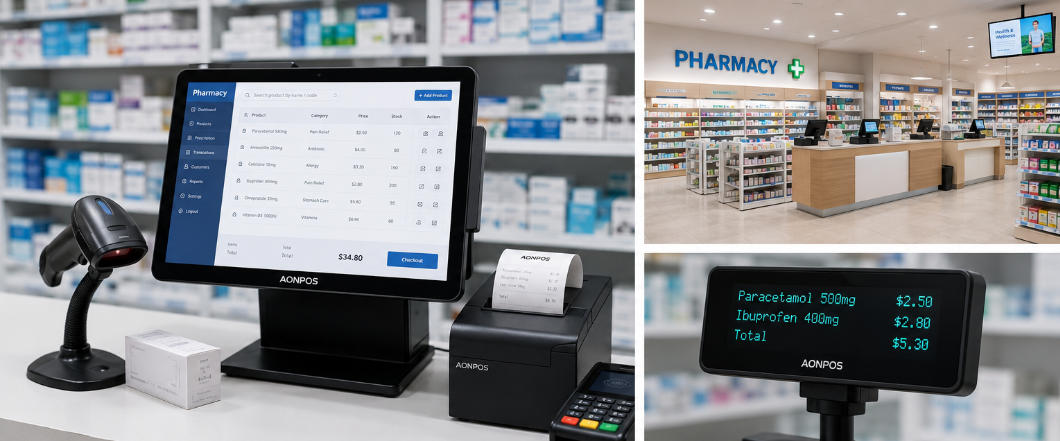
A pharmacy POS system is the combination of hardware and software used to manage checkout transactions and related retail workflows in a pharmacy.
Depending on the pharmacy’s operating model, the system may support:
The POS terminal acts as the primary workstation, while scanners, printers, cash drawers, customer displays, payment devices, and other peripherals complete the checkout configuration.
Because pharmacy software requirements vary by country, region, and business model, buyers should confirm software compatibility before selecting the hardware platform.
Pharmacies combine the workflows of healthcare service environments and retail stores. This creates several hardware requirements that may not be as important in a small general merchandise shop.
A pharmacy may sell products with similar names, packaging, strengths, or sizes. Reliable barcode scanning and a responsive POS interface help reduce manual selection errors at checkout.
Many pharmacies operate long hours, including weekends and holidays. Hardware instability can interrupt prescription pickup, delay customers, and create additional work for staff.
Commercial-grade POS hardware is generally a better choice than consumer computers that were not designed for continuous transaction environments.
Pharmacy counters often contain prescription bags, paperwork, card terminals, scanners, printers, and customer-facing materials. A compact all-in-one POS terminal helps preserve workspace while keeping essential devices accessible.
Pharmacy equipment is frequently touched by employees and may be located near customer service areas. Smooth surfaces, minimal screen bezels, stable housings, and manageable cable layouts can make routine cleaning easier.
A pharmacy checkout station may require more connected devices than a basic retail counter. Buyers should confirm that the terminal has enough USB, serial, network, display, and cash-drawer connections for the complete setup.
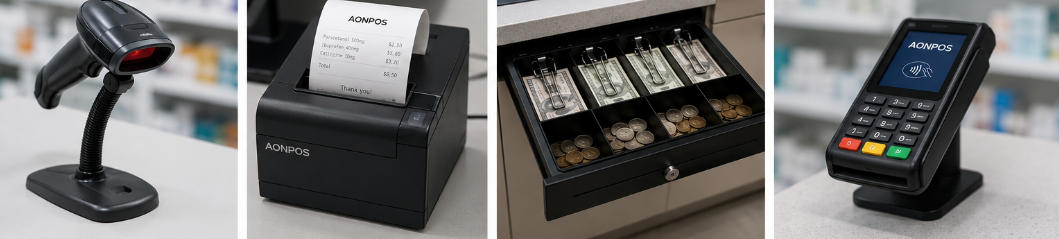
A complete pharmacy POS setup normally includes several coordinated devices.
The terminal is the central component of the pharmacy POS system. It runs the POS application and connects to the pharmacy’s checkout peripherals.
An all-in-one terminal integrates the computer and touchscreen into a single commercial enclosure. Compared with a separate desktop computer and monitor, this design can reduce counter clutter, simplify installation, and create a more professional checkout area.
Buyers can explore the AONPOS POS system range for all-in-one touchscreen terminals designed for retail and other commercial applications.
For most pharmacy counters, consider:
The final specification should be based on the software vendor’s requirements rather than choosing the highest configuration automatically.
Barcode scanning is essential in most pharmacies. It allows staff to identify products quickly and helps ensure that the correct item, package size, and price are selected.
A 2D barcode scanner is usually more flexible than a basic 1D scanner because it can read:
Scanner selection should also consider damaged-label performance, reading distance, scanning angle, and compatibility with small or curved medicine packages.
For counters with frequent transactions, a presentation scanner can provide hands-free operation. A handheld scanner may be more suitable when employees need to scan large packages or products away from the main counter position.
A thermal receipt printer creates transaction records for customers and may also print pickup references, order numbers, coupons, or return documentation.
Common printer widths include 58 mm and 80 mm. An 80 mm printer typically provides more space for detailed receipts, branding, product descriptions, tax information, and return policies.
Important printer considerations include:
A pharmacy with several checkout stations may benefit from Ethernet-connected printers because they can be managed more flexibly across the store network.
Although electronic payments continue to grow, many pharmacies still accept cash. A commercial cash drawer should provide sufficient compartments, a secure locking mechanism, and compatibility with the receipt printer or POS terminal.
Before purchasing, confirm:
For high-volume locations, steel construction and durable drawer slides can provide better long-term reliability.
The payment terminal may support credit cards, debit cards, chip cards, contactless cards, and mobile wallets. Payment hardware is often supplied or approved by a payment processor, acquiring bank, or local payment service provider.
The POS terminal and payment device may operate independently or through an integrated connection.
Before deployment, buyers should confirm:
AONPOS primarily focuses on POS hardware platforms and checkout peripherals. Payment processing approval should be confirmed separately with the relevant payment provider.
A customer display shows transaction information such as scanned products, quantities, prices, discounts, taxes, and the final amount.
For pharmacies, this can improve checkout transparency and allow customers to identify pricing issues before payment.
A larger second screen may also display:
A dual-screen configuration can be particularly useful in pharmacies that also operate as health, beauty, or convenience retailers.
Some pharmacy workflows require additional printing beyond standard sales receipts. Depending on local regulations and software functions, the pharmacy may need separate devices for product labels, shelf labels, pickup documentation, or internal stock records.
These printers should be evaluated separately from the receipt printer because print size, media type, resolution, and software integration requirements can differ.
Unexpected power interruptions can stop checkout operations and potentially affect locally stored transaction data.
A suitable uninterruptible power supply can provide temporary power for the POS terminal, network equipment, and selected peripherals. Surge protection is also important in areas with unstable electricity.
When choosing a UPS, calculate the combined power requirements of all connected equipment rather than sizing it for the POS terminal alone.
A pharmacy POS terminal should be designed for repeated daily use. Look for:
Fanless terminals can reduce noise and limit the amount of dust drawn into the enclosure. However, the terminal must still provide effective heat dissipation for the selected processor and operating environment.
Employees may perform hundreds of touchscreen actions during a shift. A slow or inaccurate screen can affect productivity and increase frustration.
Projected capacitive touchscreens generally provide smooth operation and support multi-touch gestures. A true-flat or narrow-bezel design can also be easier to clean than a deeply recessed display.
For most pharmacy counters, a 15-inch or 15.6-inch screen provides a practical balance between visibility and counter space.
The required performance depends on the pharmacy software, operating system, browser usage, database architecture, connected devices, and number of applications running at the same time.
A basic pharmacy retail application may operate well on an entry-level processor. More complex environments involving multiple software modules, local databases, video content, or background integrations may require a higher-performance configuration.
When comparing specifications, evaluate:
The article on key factors in POS hardware selection provides additional guidance on evaluating processors, memory, storage, displays, and connectivity.
Solid-state drives generally provide faster startup, quieter operation, and better resistance to vibration than mechanical hard drives.
Storage capacity should account for:
Even when most data is stored in the cloud, sufficient local storage is necessary for reliable system operation.
A pharmacy POS station may need to connect to a scanner, receipt printer, cash drawer, payment terminal, customer display, keyboard, scale, label printer, network, and other devices.
Prepare a complete peripheral list before ordering the terminal.
Common connections include:
It is advisable to leave one or two ports available for future expansion or service equipment.
Pharmacies may depend on cloud-hosted systems, central databases, real-time inventory, electronic payments, and multi-location reporting. Stable network connectivity is therefore essential.
A wired Ethernet connection is generally preferred for the primary checkout station because it offers predictable performance. Wi-Fi can provide flexibility but should be supported by secure, business-grade network infrastructure.
Where continuous service is critical, buyers may also consider:
Offline capabilities depend mainly on the POS software and payment environment, so they should be verified before deployment.
Hardware should be selected around the intended pharmacy software.
Before placing an order, confirm:
Windows is widely used for desktop pharmacy applications and legacy peripheral integration. Android may be suitable for cloud-based, lightweight, or purpose-built retail applications.
Neither platform is automatically better. The correct choice depends on the pharmacy software and IT environment.
Pharmacy POS hardware can contribute to system security, but security also depends heavily on software, network architecture, staff procedures, and regulatory requirements.
A secure deployment may include:
The POS terminal should not be treated as the sole storage location for critical business information.
Pharmacies should work with qualified software, payment, and compliance providers to determine the requirements applicable to their country and operating model.
Both configurations can work effectively, depending on the pharmacy’s priorities.
A single-screen terminal is suitable for:
It is usually simpler to deploy and requires less space.
A dual-screen terminal may be suitable for:
The second screen can show transaction details, promotional content, or customer instructions without interrupting the cashier interface.
Different pharmacy formats may require different hardware combinations.
A practical setup may include:
This configuration offers a balance of cost, reliability, and functionality.
A higher-volume location may require:
The focus should be transaction speed, ergonomic operation, and reduced downtime.
A combined pharmacy and retail store may benefit from:
This configuration supports both pharmacy service and broader retail merchandising.
A pharmacy chain should prioritize standardization.
The hardware specification may include:
Standardization makes training, maintenance, replacement, and software testing more efficient.
Retail buyers planning larger rollouts may also find the grocery store POS hardware buying guide useful, as many high-volume grocery checkout considerations also apply to pharmacy retail environments.
Before requesting a quotation, prepare clear answers to the following questions.
Provide the operating system, software name, minimum hardware specification, and required drivers.
List every scanner, printer, cash drawer, display, payment device, keyboard, scale, label printer, and external accessory.
Include initial quantities, pilot units, spare units, and expected future expansion.
Transaction volume influences the appropriate printer, scanner, cash drawer, and terminal specification.
Determine whether the store needs a basic price display or a full second touchscreen.
Confirm whether the site will use Ethernet, Wi-Fi, Bluetooth, mobile data, or a combination.
OEM and ODM buyers may require:
Certification requirements vary by country and project. Confirm electrical, environmental, radio, payment, and import requirements before mass production.
Clarify:
The guide on choosing a Chinese POS hardware supplier discusses supplier evaluation, after-sales support, and total-cost considerations in greater detail.
A terminal may appear powerful but still be unsuitable if the software requires a different operating system, screen resolution, port type, or processor architecture.
Always confirm software requirements first.
Low-cost equipment can become expensive if it produces frequent failures, lacks compatible drivers, or cannot be repaired locally.
Evaluate the total cost of ownership, including:
A terminal with enough ports for the initial setup may have no capacity for a future scanner, display, printer, or service device.
Create a port map before approving the hardware specification.
Consumer tablets and desktop computers can be useful in some mobile or temporary applications, but they may not provide the mounting stability, port selection, thermal performance, or lifecycle required for permanent pharmacy checkout counters.
Poor screen height, an unstable stand, inconvenient scanner placement, or excessive cable clutter can slow down employees throughout every shift.
Test the complete counter layout, not only the individual terminal.
For multi-location projects, a pilot installation can reveal software, driver, networking, cable, mounting, and employee-training issues before mass rollout.
A pilot should reproduce the real operating environment as closely as possible.
A reliable supplier should do more than provide a product catalog.
Look for a partner that can support:
Buyers should provide a clear request for quotation that includes expected quantities, operating system, processor, memory, storage, display requirements, ports, peripherals, certifications, packaging, destination country, and customization needs.
This allows suppliers to recommend a realistic configuration instead of quoting an unsuitable standard model.
AONPOS develops and manufactures all-in-one touch POS terminals and related checkout hardware for retail and commercial environments.
For pharmacy POS projects, AONPOS can support configurations involving:
AONPOS hardware can be configured for independent stores, equipment distributors, software providers, system integrators, and multi-location retail projects.
Because pharmacy workflows and regulations differ across markets, AONPOS buyers should provide detailed software, peripheral, certification, and deployment requirements during the quotation process.
Before purchasing a pharmacy POS system, verify the following:
Choosing the right pharmacy POS hardware is not simply a matter of purchasing a touchscreen cash register. The complete system must support the pharmacy’s software, products, transaction volume, peripherals, network environment, payment methods, and long-term operating requirements.
For most pharmacies, a reliable all-in-one touchscreen terminal, 2D barcode scanner, thermal receipt printer, cash drawer, payment terminal, wired network connection, and power protection provide a strong starting point.
Independent pharmacies may prioritize simplicity and space efficiency, while high-volume stores and pharmacy chains may require dual screens, standardized configurations, remote management, spare-unit planning, and stronger supplier support.
By defining technical requirements before requesting quotations and testing the complete setup through a pilot deployment, buyers can reduce integration problems, control long-term costs, and build a more reliable pharmacy checkout environment.
For customizable pharmacy POS terminals and peripheral configurations, visit AONPOS to discuss your software platform, project quantity, target market, and OEM or ODM requirements.
Tel / Whatsapp : +86 -15999943922
Email : nikki@aonpostech.com


© 2026 Shenzhen Aonpos Technology Co., Ltd .All Rights Reserved