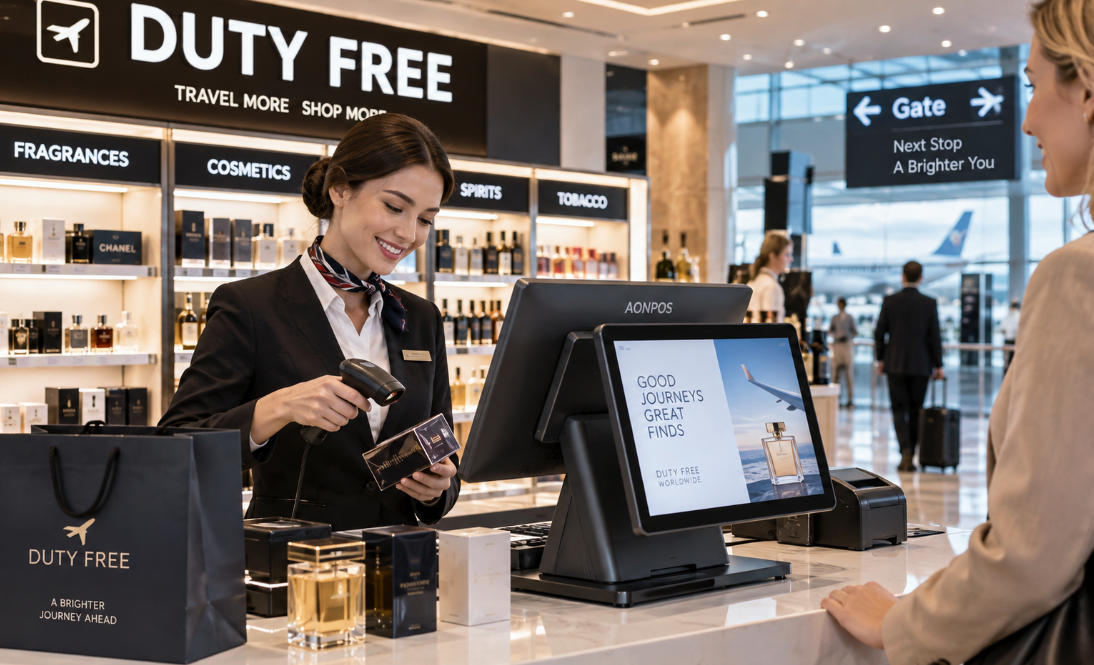
POS for Duty Free Shops: Building a Faster and More Reliable Travel Retail Checkout
Sep 07, 2026
Duty-free retail operates under very different conditions from an ordinary high-street store. A checkout counter inside an international airport, border terminal, ferry port, or cruise facility may serve customers from dozens of countries within a single day. Transactions often involve premium products, multiple currencies, passenger or travel information, destination-specific purchasing rules, and customers who are working against boarding times.
For this reason, choosing a POS for duty free shops is not simply a matter of installing a touchscreen and payment terminal. The hardware must fit into a wider travel-retail environment where speed, reliability, peripheral compatibility, customer visibility, and system integration all affect daily operations.
For duty-free operators, software companies, distributors, and system integrators, the most effective approach is to select POS hardware around the complete checkout workflow rather than treating the terminal as an isolated device.
Why Duty-Free Checkout Places Greater Demands on POS Hardware
Traffic in duty-free stores can change dramatically throughout the day. A store may be relatively quiet between flights and then experience a sudden surge when several international departures are scheduled within the same period.
Unlike shoppers in a conventional retail center, airport customers often have a fixed deadline. A slow checkout does not simply cause inconvenience; it can lead customers to abandon purchases because they need to reach their gate.
The checkout station therefore needs to handle repeated scanning, product lookup, payment processing, receipt printing, customer information display, and communication with other systems without creating unnecessary delays.
At the same time, duty-free stores commonly sell cosmetics, fragrances, alcohol, tobacco, confectionery, electronics, travel accessories, and luxury merchandise. This creates large SKU databases and different transaction requirements across product categories.
A reliable duty-free POS environment must combine fast interaction with sufficient flexibility to support the retailer's selected software and peripheral ecosystem.
1. Fast Processing Matters When Passenger Traffic Arrives in Waves
Checkout performance is especially important in travel retail because transaction demand is rarely evenly distributed.
A group arriving from a tour bus, a long-haul flight approaching boarding time, or a promotional event can quickly create a queue. Even small delays repeated across dozens of customers can reduce the number of transactions completed during a peak period.
POS hardware should therefore provide enough processor performance, memory, and storage for the intended retail application.
The correct specification depends on the software workload. A straightforward checkout application may operate comfortably on an entry-level commercial processor, while larger product databases, multiple background applications, customer-facing media, or complex integrations may justify more powerful configurations.
Solid-state storage is also useful for commercial POS installations because it supports quick startup and eliminates the moving components found in mechanical hard drives.
AONPOS offers POS system hardware with multiple configuration options, allowing buyers and solution providers to select specifications according to their software platform, deployment scale, and target market.
The objective should not be to purchase the highest possible specification. It should be to choose a stable configuration with enough performance headroom for the expected workload and future software requirements.
2. Dual-Screen POS Can Improve Transparency at the Counter
Customer-facing displays are particularly valuable in duty-free environments.
International passengers may be purchasing several products while dealing with unfamiliar currencies, promotions, discounts, or bundle offers. Showing transaction information on a second screen allows customers to follow the checkout process as items are added.
Depending on the POS software, the customer display may show:
Product names and quantities
Prices and discounts
Transaction totals
Promotional content
Loyalty information
Brand advertising
Payment instructions
This additional visibility can reduce confusion and give customers an opportunity to identify an incorrect item or quantity before payment is completed.
For duty-free retailers selling premium beauty products, spirits, luxury accessories, or electronics, the second display can also become part of the merchandising experience rather than functioning purely as a transaction screen.
A dual-screen retail POS terminal, for example, can provide a cashier-facing touchscreen together with a customer-facing display while maintaining a relatively compact counter footprint.
Before selecting a dual-screen system, however, buyers should confirm that their POS software supports independent customer-display content and the required resolution.
3. Peripheral Connectivity Should Be Planned Before Hardware Is Ordered
Duty-free checkout stations can involve more peripherals than many standard retail counters.
Depending on the store and local requirements, a workstation may need to connect with:
1D or 2D barcode scanners
Passport or travel-document readers
Boarding-pass scanners
Payment terminals
Thermal receipt printers
Cash drawers
Customer displays
Loyalty or membership readers
External monitors
Network devices
Additional verification equipment
This makes interface planning an important part of hardware selection.
A terminal that appears suitable based on processor and screen specifications may still create deployment problems if it does not provide enough USB, serial, LAN, display, or other required connections.
System integrators should map every peripheral before confirming the POS configuration. They should also determine whether each device uses a physical interface, wireless connection, or network-based communication.
For large-scale deployments, standardizing this interface map across all checkout stations can simplify installation, troubleshooting, spare-parts management, and future replacement.
4. Barcode Performance Influences Checkout Throughput
Duty-free stores process products from many brands and countries, making barcode scanning a central part of checkout operations.
Cashiers should not need to repeatedly reposition ordinary products before the scanner recognizes them. During busy periods, scanning performance directly affects transaction speed.
Retailers may use handheld scanners, presentation scanners, or embedded scanning equipment according to the checkout design.
A fixed presentation scanner can be effective at high-volume counters because employees can move products quickly across the scanning area. Handheld devices provide additional flexibility for larger products or items that are difficult to position.
2D scanning can also be useful when the retail workflow needs to read QR codes or other two-dimensional codes in addition to traditional retail barcodes.
The scanner should always be tested with the real barcode types and software environment used in the project rather than selected only from specification sheets.
5. International Customers Require Flexible Payment Environments
Duty-free stores serve a highly international customer base. Payment preferences can therefore vary significantly between passengers.
Depending on the country and payment provider, travelers may expect to use credit cards, debit cards, contactless cards, mobile wallets, QR-based payments, or cash.
Payment processing itself normally depends on the retailer's payment provider, software platform, and certified payment terminal rather than the main POS computer. The POS hardware must nevertheless be able to communicate reliably with the required payment environment.
Buyers should verify operating-system support, communication interfaces, drivers, and integration requirements before deployment.
This is especially important when the same POS hardware platform will be deployed across several countries. A payment configuration used in one region may not be identical to another.
Keeping the main terminal flexible while allowing market-specific payment peripherals to be connected can simplify international rollouts.
6. Multi-Currency and Tax-Free Workflows Depend on Software—But Hardware Must Support Them
Duty-free retailers frequently operate in environments where customers think in different currencies and where purchases may be affected by destination, passenger status, or local tax regulations.
These functions are primarily handled by retail software, payment systems, tax platforms, and external databases.
The POS terminal provides the computing platform on which those applications operate.
Hardware buyers should therefore avoid evaluating a terminal separately from the software stack. Before confirming an order, they should identify requirements such as:
Supported operating system
Minimum CPU specification
Required RAM
Storage capacity
Database size
Network requirements
Display resolution
Required ports
Scanner compatibility
Printer compatibility
Customer-display support
The same principle applies to passenger verification or boarding-pass workflows. If software needs information from a scanner or external travel system, the terminal must provide the interfaces and computing resources required by that architecture.
Hardware compatibility should be confirmed before mass deployment, not after the equipment reaches the store.
7. Reliability Is Critical in Airport and Border Retail
A conventional retailer may sometimes redirect customers to another part of the store when one checkout station fails. A duty-free shop operating near an international departure gate has much less flexibility.
Passenger traffic may exist for only a short window.
Hardware downtime during that period can immediately affect revenue.
Commercial POS hardware should therefore be evaluated for continuous retail use. Important considerations include thermal management, storage reliability, enclosure construction, touchscreen durability, cable stability, and accessibility for maintenance.
For multi-location operations, it is also sensible to maintain spare terminals or replacement peripherals.
A standardized hardware platform makes this significantly easier. Rather than supporting many generations of unrelated equipment, the technical team can maintain a smaller set of system images, drivers, spare components, and installation procedures.
This approach can reduce recovery time when equipment needs to be replaced.
8. Counter Space Should Not Be Underestimated
Duty-free stores often invest heavily in visual merchandising, and checkout counters may need to accommodate shopping bags, displays, payment equipment, receipt printers, scanners, promotional material, and impulse-purchase products.
Large desktop computers with separate monitors can consume valuable counter space and create additional cabling.
All-in-one POS terminals integrate the touchscreen and computer into a single enclosure, which can create a cleaner installation and reduce the number of separate components around the cashier.
This is particularly useful for airport stores where both aesthetics and efficient use of floor space matter.
Screen size should still be chosen according to the actual software interface. A compact display can save space, but a screen that is too small may make complex retail software harder for employees to use.
The best installation balances ergonomics, visibility, counter dimensions, and available workspace.
9. Network Resilience Should Be Part of the Deployment Plan
Modern duty-free operations may depend on network connectivity for inventory synchronization, central reporting, payment communication, software updates, loyalty programs, or communication with headquarters.
A stable wired Ethernet connection is often suitable for fixed POS stations, while Wi-Fi can provide flexibility in locations where cable installation is difficult.
However, retailers should also consider what happens when connectivity is interrupted.
Offline transaction capabilities depend on the POS software and payment environment, but hardware deployment should support the retailer's continuity strategy.
For mission-critical locations, this may include redundant network infrastructure, spare terminals, documented recovery procedures, and locally available technical support.
The goal is not to assume that connectivity will never fail. It is to design the checkout environment so that a temporary infrastructure issue does not automatically become a complete retail shutdown.
10. Duty-Free Chains Benefit From Hardware Standardization
Large duty-free operators may run stores across multiple terminals, airports, ports, or countries.
Standardization becomes increasingly valuable as the network grows.
Using a consistent POS platform can make it easier to:
Create standardized software images
Train employees
Maintain drivers
Manage replacement devices
Stock spare parts
Coordinate technical support
Deploy future stores
Negotiate repeat hardware orders
Some regional variation will always be necessary because payment equipment, electrical standards, peripheral requirements, and regulatory processes differ between markets.
However, keeping the core POS platform consistent wherever possible can reduce operational complexity.
This is similar to the hardware strategy used in other high-traffic retail environments. Buyers evaluating transaction-heavy stores can also review AONPOS's guide to POS solutions for convenience stores, where checkout speed, peripheral compatibility, counter space, and continuous operation are also important considerations.
Choosing a POS Configuration for Different Duty-Free Environments
Not every duty-free location requires the same hardware.
A small border shop with one or two counters might use a compact single-screen all-in-one terminal, barcode scanner, receipt printer, cash drawer, and external payment terminal.
A high-traffic international airport location may benefit from dual-screen terminals, presentation scanners, high-speed receipt printers, customer displays, multiple payment devices, and spare checkout units.
Luxury duty-free boutiques may place more emphasis on industrial design, customer-facing displays, quiet operation, and integration with premium store environments.
Large travel-retail groups may prioritize standardized configurations, long-term supply, model consistency, OEM branding, and repeat-order capability.
The correct specification should therefore be based on operational conditions rather than simply copying a generic retail setup.
Why AONPOS Fits Duty-Free POS Hardware Projects
For companies building duty-free retail solutions, hardware sourcing often involves more than purchasing individual terminals.
Software developers, distributors, system integrators, and retail groups may require specific processors, memory capacities, storage options, screen configurations, colors, branding, interfaces, or peripheral combinations.
AONPOS focuses on commercial POS hardware and supports OEM and ODM requirements for international projects.
Its product portfolio includes all-in-one touch POS terminals, single- and dual-screen systems, barcode scanners, thermal printers, handheld POS devices, touch monitors, and related checkout hardware.
For duty-free projects, this allows buyers to discuss configurations around the complete deployment instead of evaluating the terminal without considering its surrounding peripherals.
Depending on the product and technical feasibility, OEM/ODM projects may also involve customized branding, enclosure colors, hardware specifications, displays, interfaces, built-in modules, or packaging.
For distributors and POS software companies building solutions for different markets, configurable hardware can help create a standardized platform while still accommodating customer-specific requirements.
A Practical Checklist Before Ordering Duty-Free POS Hardware
Before selecting hardware for a duty-free store, define the complete checkout environment.
Confirm expected transaction volume, number of counters, operating hours, software platform, CPU and memory requirements, storage capacity, number of SKUs, customer-display requirements, scanner types, receipt printer configuration, payment terminals, network infrastructure, and every required physical interface.
Then consider the deployment beyond the initial installation.
Will the same model be required for future stores? Are spare units needed locally? Can the hardware configuration remain consistent across multiple countries? How quickly can a failed terminal be replaced? Can the supplier support OEM branding or repeat production?
These questions often matter more to long-term operating cost than small differences in initial unit price.
Final Thoughts
The best POS for duty free shops is not defined by one processor, one screen size, or one peripheral. It is the hardware platform that fits smoothly into the retailer's complete travel-retail workflow.
Duty-free environments demand fast checkout, dependable operation, strong peripheral connectivity, efficient use of counter space, clear customer interaction, and sufficient flexibility for international payment and retail software ecosystems.
Small locations may operate efficiently with a compact single-screen terminal. Busy airport stores may benefit from dual displays, faster scanning and printing equipment, and redundant hardware. Multi-country operators should pay particular attention to standardization, configuration consistency, serviceability, and long-term supply.
For POS software companies, distributors, system integrators, and duty-free retailers developing new projects, AONPOS provides configurable commercial POS hardware and OEM/ODM manufacturing support that can be matched to different retail environments.
The most successful deployment begins by defining the workflow first—and then selecting hardware capable of supporting it reliably every day.